![SWTB_logo_rgb_color_mode-wPadding-2000x961.png]](https://help.softwaretoolbox.com/hs-fs/hubfs/SWTB_General/Images/Press_Kit/SWTB_logo_rgb_color_mode-wPadding-2000x961.png?height=50&name=SWTB_logo_rgb_color_mode-wPadding-2000x961.png)
TOP Server V7 introduces a disclaimer message that appears when a virtual environment is detected. You may see it after upgrading even if you were already running TOP Server on the same virtual machine.
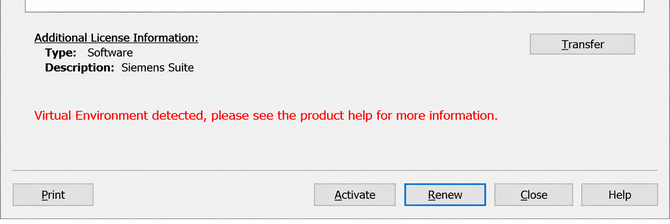
Not necessarily. The message is displayed when TOP Server detects a virtual environment; it does not, by itself, indicate an issue with the installation or operation of TOP Server.
Do I need to make configuration changes?If TOP Server was running in the same virtual environment previously without issues and continues to operate normally after the upgrade, likely no changes are needed solely because this message appears.
This guidance is conditional on the environment being unchanged and TOP Server operating normally. The message alone is not a reason to adjust the configuration.
What guidance should I review for a virtual-machine installation?Review Software Toolbox’s existing FAQ, Running TOP Server on a Virtual Machine, for additional virtual-machine deployment guidance.