![SWTB_logo_rgb_color_mode-wPadding-2000x961.png]](https://help.softwaretoolbox.com/hs-fs/hubfs/SWTB_General/Images/Press_Kit/SWTB_logo_rgb_color_mode-wPadding-2000x961.png?height=50&name=SWTB_logo_rgb_color_mode-wPadding-2000x961.png)
If you are upgrading from TOP Server Version 4 to a newer Version of TOP Server this is not a problem. All you have to do is choose the Remove and Redirect option during installation.
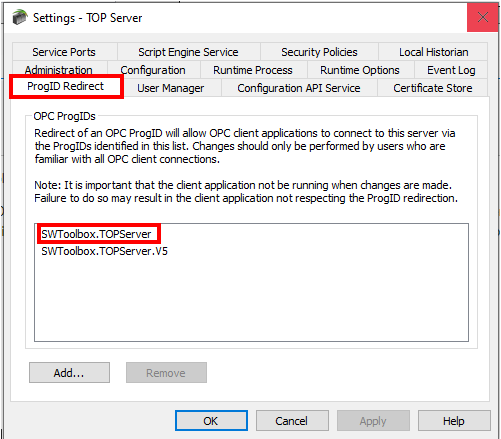
Installing the newer Version of TOP Server on a new PC, but need to have the Old Version 4 ProgID so you don't have to change your OPC connections with existing projects? No problem, after the installation of the new version of TOP Server, right click on the Administration Icon in the System Tray, and select Settings. Under the ProgID Redirect Tab select to Add a new ID, and manually enter the appropriate ProgID - shown below:
Version 4 ProgID: SWToolbox.TOPServer
Version 5 ProgID: SWToolbox.TOPServer.V5