![SWTB_logo_rgb_color_mode-wPadding-2000x961.png]](https://help.softwaretoolbox.com/hs-fs/hubfs/SWTB_General/Images/Press_Kit/SWTB_logo_rgb_color_mode-wPadding-2000x961.png?height=50&name=SWTB_logo_rgb_color_mode-wPadding-2000x961.png)
Introduction
Welcome. This document will explain a number of ways the OPC Data Logger allows you to acquire the data you wish to log.
This document is intended to provoke thought on how you might choose to acquire your data.
Any and all users of the OPC Data Logger are recommended to read this entire document so as to gain a good understanding of the different data acquisition methods available.
This document will begin by explaining some basic concepts, such as Subscriptions and One-Shot Reads, then will describe the differences between Synchronous and Asynchronous calls, and the difference between reading data from Cache or from the Device.
What does “Data Acquisition” actually mean?
Data acquisition simply means “getting data”. The OPC Data Logger offers a number of ways in which you can acquire your data. Because the OPC Data Logger is based on the OPC specifications, the following OPC methodologies are directly supported:
| • Subscription reads | IOPCDataCallback |
| • One-shot reads | IOPCSyncIO, IOPCSyncIO2, IOPCAsyncIO, IAsyncIO2, IAsyncIO3 |
What is the difference between Subscriptions and one-shot Reads?
| • Subscription |
The client requests the Server to poll the Tags at a specified scan-rate, such as 100 msec. Upon each successful polling of the tags, the OPC Server will check to see if the value has changed. If the value has changed then a notification is sent to the OPC Data Logger. For example, you might monitor a freezer temperature by polling the temperature every 100 msec. Although the OPC Server may be polling the tag 10 times per second, several hours could go by before an OPC Client receives any updates as a freezer temperature remains fairly constant. |
| • One-shot Read | Unlike a Subscription, a one-shot read does not poll the tags at the device. Instead, a single call to read the values is made. Once the request is complete, the read request is complete. |
What is the difference between Synchronous and Asynchronous?
In the case of one-shot reads, you can specify how the OPC Client requests a reading:
| • Synchronous | A synchronous call is often referred to as a “blocking call”. This means that when the OPC Data Logger calls the read function, it will wait while the OPC Server retrieves the value from the device. |
| • Asynchronous |
Asynchronous calls are not as expensive as their synchronous counterparts because the OPC Data Logger can simply request the OPC Server to read the items, but the OPC Data Logger does not block by waiting for the reply. Instead, the OPC Data Logger will continue processing and when the OPC Server has finally retrieved the value it will push it to the OPC Client. 🔷 This is a much more efficient model and is recommended. |
What is the difference between Cache and Device?
In the case of the one-shot reads, there are a couple of options that concern the origins of where the data should be read:
| • Cache |
When reading the value of a tag, the value should be read from the OPC Servers cache memory. 🔶 Use of this option is not recommended. |
| • Device |
When reading the value of a tag, the value should be read from the underlying device. This is much slower than the Cache option, but is guaranteed to either work or fail. In the event of a failure, the OPC Quality code and/or a general error message will be thrown. 🔷 Use of this option is recommended. |
Where are the Data Acquisition Settings?
In the OPC Data Logger, the data acquisition settings are accessible within the properties of a Group:
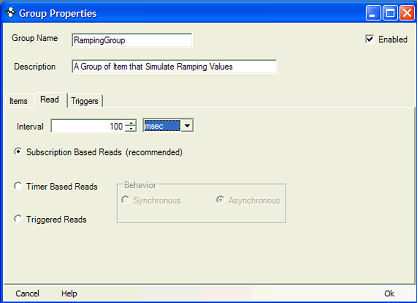
Figure 1: Data Acquisition Settings
The Group Properties are accessible by opening the properties of the Project, found under the “Projects” tree view.
In this screen you have the following options:
| • Subscription based reads | Will log the values of Items only when their value(s) change. 💠See Subscription Method. |
| • Timer based reads | Will cause the OPC Data Logger to perform a one-shot read of the Tags at a specified time-frame, i.e. perform a one-shot read every 1 minute etc. 💠See One-shot Read Method. |
| • Triggered reads | Does not poll the items at all, but instead initializes a one-shot read just once. 💠See Triggered Read Method. |
Each of these options will be discussed in more detail below.
Acquiring Data
Firstly, the Items you wish to log must be defined within a Group. Each group can specify just one way in which it can acquire the values of its items.
Here we will discuss how you setup each different way of acquiring data. Then, we will look into combining these methods into new forms of acquiring data.
Subscription Method
The subscription method was described in section “What is the difference between Subscriptions and one-shot Reads?”
The subscription is very easy to setup, you simply specify a scan-rate, and that is all. This is shown in Figure 1.
One-shot Read Method
The one-shot read method was described in section “What is the difference between Subscriptions and one-shot Reads?”
The one-shot read is very easy to setup too, you simply specify the frequency of a timer that will initiate the read, and then specify how the data should be read, such as Synchronously or Asynchronously:
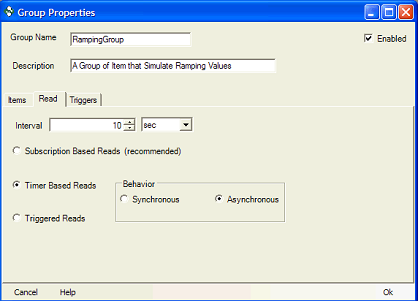
Figure 2: Timer Based Reads
Triggered Read Method
The triggered read method is a 2-step configuration process. First, you must configure the group to utilize this method:

Figure 3: Triggered Read Setting
Next, we must specify which trigger(s) will cause the read to take place. This is done by clicking on the Triggers tab:
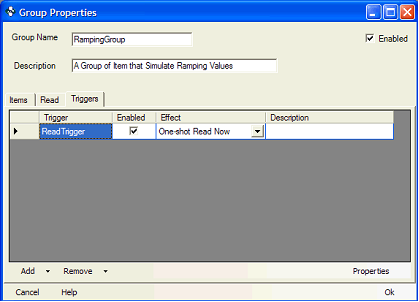
Figure 4: Triggers List
In this particular screen, a trigger has been created and added to the list. You can add as many triggers as you wish to this list.
Please consult the help documentation for more information about the various types of triggers that are available.
Combining Read Methods, such as Subscribing with Triggered Reads
The key to combining read methods is to understand that a Group consists of the items you want to log, along with the setting that determines how those values are read/collected.
Because a Project can contain multiple Groups, the way that you accomplish combining read methods is to simply define the items you wish to log in multiple groups. Consider the following example:
- Log items {item1, item2, item3, item4, item5} via a subscription setup with a 100 msec scan-rate.
- Also log the same items at 9am, 1pm, 6pm and 3am regardless.
The solution:
- Create a group containing these items, and specify a subscription with 100 msec scan-rate.
- Create the necessary triggers, in this case 4 Scheduled triggers all set to occur each day. Please refer to Figure 5.
- Create another group containing the same items, and configure it to use triggers created in the previous step.
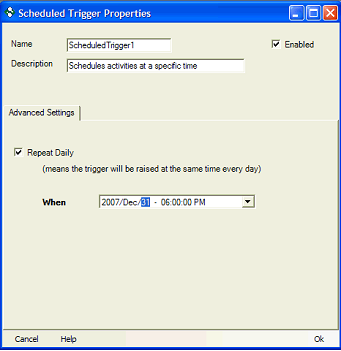
Figure 5: Scheduled Trigger Properties
Summary
Table of Figures
- Figure 1: Data Acquisition Settings
- Figure 2: Timer Based Reads
- Figure 3: Triggered Read Setting
- Figure 4: Triggers List
- Figure 5: Scheduled Trigger Properties