![SWTB_logo_rgb_color_mode-wPadding-2000x961.png]](https://help.softwaretoolbox.com/hs-fs/hubfs/SWTB_General/Images/Press_Kit/SWTB_logo_rgb_color_mode-wPadding-2000x961.png?height=50&name=SWTB_logo_rgb_color_mode-wPadding-2000x961.png)
Introduction
Intended Audience
This document was created for users of the OPC Data Logger who are using triggers of different types within a single configuration.
Purpose of this Document
This document will help users understand how the different types of triggers interact with each other.
Using different types of triggers that have different effects
In this scenario we have created two different types of triggers. We will use one to start logging and use the other to stop logging. For this example we have created the following two types of triggers.
The first trigger is a Monitored Item Trigger. The trigger will fire when the value of Bool_1 is true.

The second is a Scheduled Trigger. The trigger will fire every day at 6 pm.
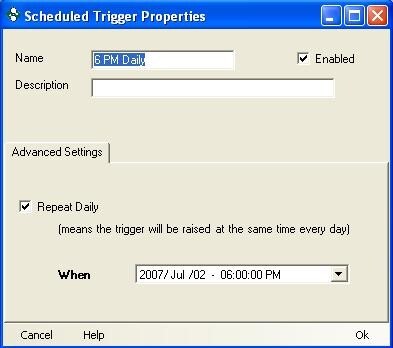
The Monitored Item Trigger is used to start logging. The Scheduled trigger is used to stop logging.

Here is how the Data Logger will handle this situation.
- Data will begin to log when the value of Bool_1 goes to true regardless of what time of day it is.
- Data logging will stop at 6 pm daily regardless of the value of Bool_1.
- Data will begin to log only when the value of Bool_1 toggles from False to True.
Using different types of triggers that have the same effect
In this scenario we have created two different types of triggers. We will use them both to start logging. For this example we have created the following two types of triggers.
The first trigger is a Monitored Item Trigger. The trigger will fire when the value of Bool_1 is true.
The second is a Scheduled Trigger. The trigger will fire every day at 9 am.
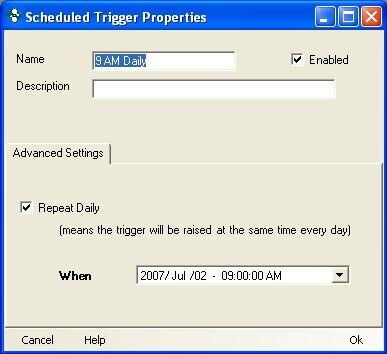
The Monitored Item Trigger is used to start logging. The Scheduled Trigger is also used to start logging.
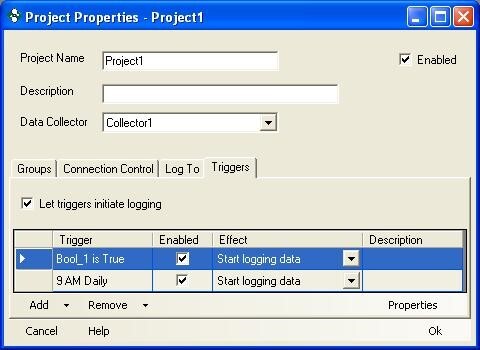
Here is how the Data Logger will handle this situation.
- Data will begin to log when the value of Bool_1 goes to true regardless of what time of day it is.
- Data will begin to log at 9 am daily regardless of the value of Bool_1.
- If data is already logging and the trigger fires to start the logging, the start logging request will be logged in the event log but will be ignored since data is already being logged.