![SWTB_logo_rgb_color_mode-wPadding-2000x961.png]](https://help.softwaretoolbox.com/hs-fs/hubfs/SWTB_General/Images/Press_Kit/SWTB_logo_rgb_color_mode-wPadding-2000x961.png?height=50&name=SWTB_logo_rgb_color_mode-wPadding-2000x961.png)
What determines which items get logged? There are three main layers that define which tags will get logged: Data Collector, Groups, and Data Presentation Mode
Data Collector
A Data Collector defines which computer and which OPC Server the items being logged will come from. Once you have specified a Data Collector you can then add Groups of items to your project.
Groups
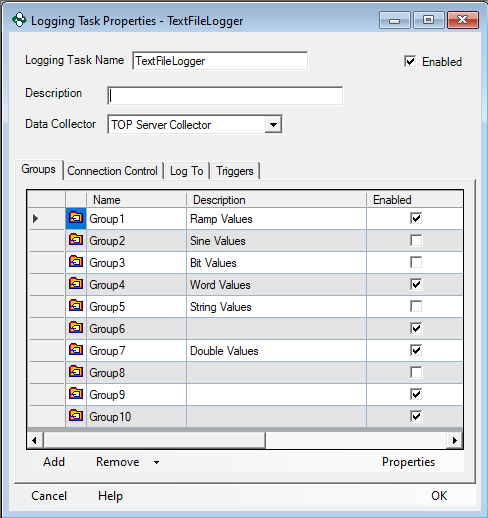
Any tag you want to log must be added to a Group. A logging task is where groups are stored. To view all your Groups for a specific logging task open the Properties of that project. From this page you can enable and disable groups for logging. If a Group is disabled none of its items will be logged.
Data Presentation Mode
There are two different types of Data Presentation modes: Table and Detail.
Table Mode
In Table Mode only the groups you add to your Table Presentation will be logged. Once you add a group to your presentation you can disable any items you do not want to log. Each Table Presentation requires at least one group containing at least one item. There is no limit to the number of groups each presentation can have.

Detail Mode
In Detail Mode all enabled groups within the project will be logged. You can disable each group within the Logging Task Properties page.
