![SWTB_logo_rgb_color_mode-wPadding-2000x961.png]](https://help.softwaretoolbox.com/hs-fs/hubfs/SWTB_General/Images/Press_Kit/SWTB_logo_rgb_color_mode-wPadding-2000x961.png?height=50&name=SWTB_logo_rgb_color_mode-wPadding-2000x961.png)
What determines when Data will be logged? Data logging can be started and stopped manually or automatically.
Starting and Stopping Logging Manually
Data logging can be started manually two ways:
- Using the Start Logging command within the GUI.
- Right clicking the icon in the system tray and selecting Start Logging.
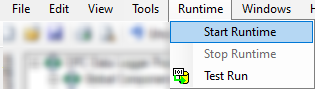 |
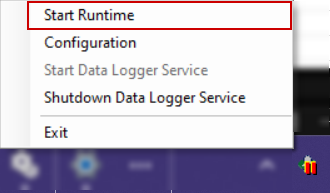 |
Data logging can be stopped manually two ways:
- Using the Stop Logging command within the GUI.
- Right clicking the icon in the system tray and selecting Stop Logging.
Starting and Stopping Logging Automatically
Data logging can be started and stopped automatically by using triggers. There are three different types of triggers: scheduled trigger, recurring trigger, and monitored item trigger. They can all be used to start or stop data logging. For more information about these triggers and how they can be used please refer to the Triggers section.
To use a trigger that starts or stops logging you must add it within your logging task properties under the Triggers tab and assign an effect to it. For more information about adding triggers to your logging task, please refer to the Logging Task section.