![SWTB_logo_rgb_color_mode-wPadding-2000x961.png]](https://help.softwaretoolbox.com/hs-fs/hubfs/SWTB_General/Images/Press_Kit/SWTB_logo_rgb_color_mode-wPadding-2000x961.png?height=50&name=SWTB_logo_rgb_color_mode-wPadding-2000x961.png)
You can access the expiration information for your driver support and maintenance by following these steps:
TOP Server V6/V7
- Launch the TOP Server V5 License Utility
- Right-click system tray Admin icon and select "License Utility" or in the configuration window Tools ⇒ Launch License Utility
- Start ⇒ Programs ⇒ Software Toolbox ⇒ TOP Server 6/7 ⇒ License ⇒ License Utility
- You will be presented with a list of drivers that are currently licensed in your TOP Server V5. Underneath this list it says: Additional License Information. The support expiration date is listed here in the following format: DD-MM-YYYY
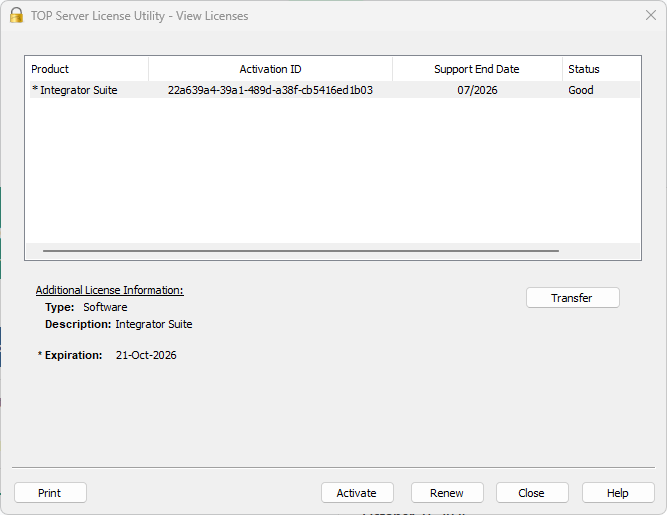
- TOP Server license maintenance is not updated automatically.
- When maintenance is renewed, a renewal file is sent to the purchaser.
- Open the TOP Server License Utility.
- Select Renew.
- Browse to the renewal file you received.
- Upload the file to complete the maintenance update.
- Go to Activation.SoftwareToolbox.com.
- Log in to your account.
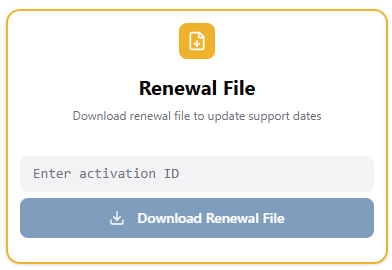
- Enter your Activation ID.
- Download the renewal file.
- Return to the TOP Server License Utility and upload it using Renew.
TOP Server V5
- Launch the TOP Server V5 License Utility
- Right-click system tray Admin icon and select "License Utility" or
- Start ⇒ Programs ⇒ Software Toolbox ⇒ TOP Server 5 ⇒ License ⇒ License Utility
- With "View License Details for this Computer" selected, click Next.
- You will be presented with a list of drivers that are currently licensed in your TOP Server V5. Underneath this list it says: Additional License Information. The support expiration date is listed here in the following format: DD-MM-YYYY
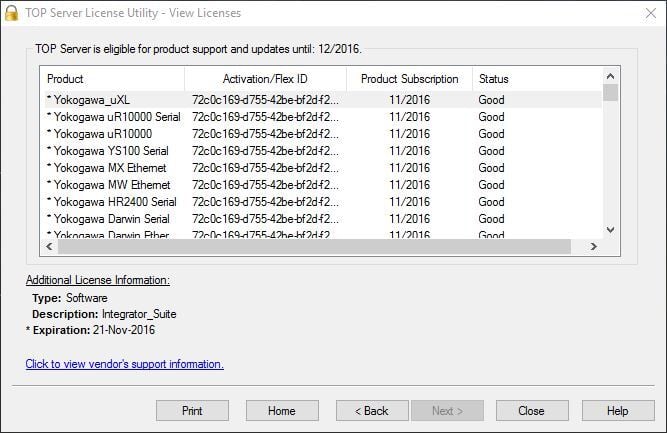
If the date is current, you are eligible to upgrade to the latest version.
The Support and Maintenance Contract period can be extended by renewing your support and maintenance. Please contact us for information on renewing your support and maintenance contract.