![SWTB_logo_rgb_color_mode-wPadding-2000x961.png]](https://help.softwaretoolbox.com/hs-fs/hubfs/SWTB_General/Images/Press_Kit/SWTB_logo_rgb_color_mode-wPadding-2000x961.png?height=50&name=SWTB_logo_rgb_color_mode-wPadding-2000x961.png)
Media-Level Redundancy is supported for the following drivers:
- Serial or Ethernet drivers
- Modbus Plus driver (operating in client mode)
- OPC UA Client driver
- OPC DA Client Driver
Currently, drivers that do NOT support Media-Level Redundancy are as follows:
- Advanced Simulator
- Allen-Bradley ControlLogix Unsolicited
- Allen-Bradley Data Highway Plus
- Allen-Bradley Unsolicited Ethernet
- Custom Interface
- Dataforth isoLynx
- DDE Client
- Hilscher Universal
- Memory-Based
- Mettler Toledo
- Modbus Plus (Data Server/Unsolicited Mode Only)*
- Modbus Unsolicited Serial
- Modbus Ethernet (Server/Unsolicited Mode Only)**
- ODBC Client
- OPC XML-DA Client
- SattBus Serial
- Siemens TCP/IP Unsolicited Ethernet
- Simulator
- Sixnet UDR
- User-Configurable (U-CON)
- WITS Level 0 Passive
- Yaskawa Memobus Plus
*Modbus Plus operating in Data Master/Solicited Mode is supported.
**Modbus Ethernet operating in Master Mode is supported.
Media Level Redundancy is a free feature plug-in for the TOP Server 5 starting version 5.6 and TOP Server V6.x.
To enable Media Level Redundancy the feature must be selected to be installed under Plug-Ins for server communications.
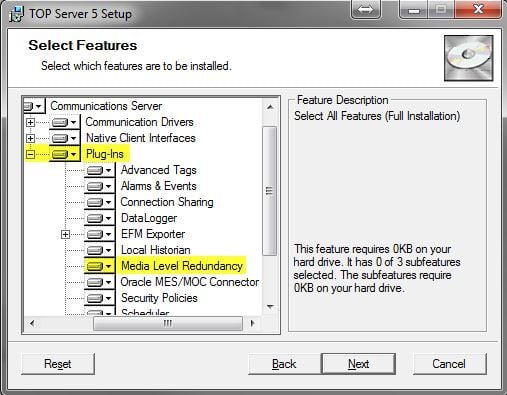
If you need a copy of the TOP Server installer, you may visit our Old Version Request Form (You can download the latest version here as well). You will want to run the installer for the version you currently are using. You can see what version you are using by opening the TOP Server Configuration and then clicking Help ⇒ Support Information