![SWTB_logo_rgb_color_mode-wPadding-2000x961.png]](https://help.softwaretoolbox.com/hs-fs/hubfs/SWTB_General/Images/Press_Kit/SWTB_logo_rgb_color_mode-wPadding-2000x961.png?height=50&name=SWTB_logo_rgb_color_mode-wPadding-2000x961.png)
When attempting to write to my Mitsubishi PLC using the TOP Server Mitsubishi Ethernet driver from my HMI, I am receiving the following error message:
"Unable to write to tag '' on device ''. Device must be configured to allow writes while in RUN mode."
How can I resolve this issue and allow writes to the PLC?
This error is returned when your Mitsubishi PLC has not been enabled to allow write operations while it is in RUN mode. You will need to do the following, based on the type of Mitsubishi PLC you are using:
- A Series or QnA Series PLCs - Configure the AJ71E71 card (Ethernet Module) to allow writes to occur during RUN by setting DIP switch 7 to the ON position.
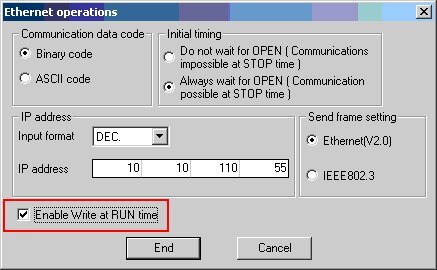
- Q Series - Use GX Developer to enable the setting "Enable Write at RUN time"
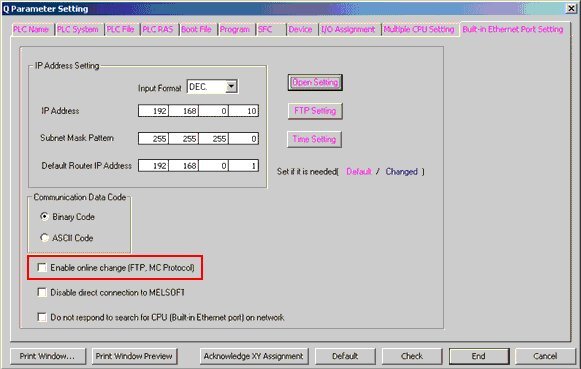
- Q Series with Built-In Ethernet - Use GX Developer to enable the setting "Enable online change (FTP, MC Protocol)"