![SWTB_logo_rgb_color_mode-wPadding-2000x961.png]](https://help.softwaretoolbox.com/hs-fs/hubfs/SWTB_General/Images/Press_Kit/SWTB_logo_rgb_color_mode-wPadding-2000x961.png?height=50&name=SWTB_logo_rgb_color_mode-wPadding-2000x961.png)
Before the TOP Server Modbus Plus driver in the TOP Server Modbus Suite can communicate to your Modbus Plus device the Modbus Plus Adapter must show up in Windows Device Manager. This requires drivers from the Adapter Manufacturer. Typically this is Schneider Electric. We recommend contacting your Modbus Plus Adapter Vendor to ensure you have the correct Windows drivers for your operating system. These drivers should have been included with the hardware and thus should be free.
Full details on the Modbus Plus interface cards supported by the TOP Server Modbus Plus driver are found here.
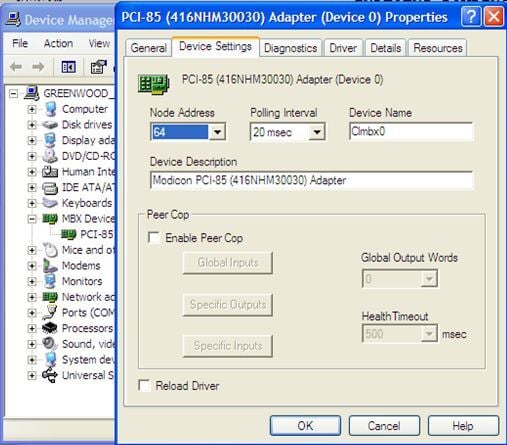
Once you have the Windows Drivers installed correctly you should see the device in Windows Device Manager. Below is an example of a PCI-85 card. The Node Address in the picture is the Modbus Plus Node Address of the PC. This MUST be different than the node address of your Modbus PLC device.
For example, typically the Modbus Plus Node Address will default to 1. If your Modbus Plus PLC also has a Node Address of 1 the TOP Server will not be able to communicate with the PLC. If you feel this is the case you will want to change the Node Address in device manager and reboot your PC.
Once this is complete, configuring the TOP Server Modbus Plus OPC/IO driver to talk to the card will be easy.
If you are using the TSXCUSBMBP Adapter that converts from USB to Modbus Plus, we have a detailed Getting Started Guide HERE