![SWTB_logo_rgb_color_mode-wPadding-2000x961.png]](https://help.softwaretoolbox.com/hs-fs/hubfs/SWTB_General/Images/Press_Kit/SWTB_logo_rgb_color_mode-wPadding-2000x961.png?height=50&name=SWTB_logo_rgb_color_mode-wPadding-2000x961.png)
In S5/S7 for Windows, symbols are used to add a descriptive meaning to PLC addresses, making your logic easier to understand. The Symbol Table holds the symbols and can be edited using the Symbol Table Editor interface. To open the editor, click on the "Edit Symbolic Table" icon found in the menu bar. This icon looks like a document with writing on it.

There are three columns, enter the text you want for your symbol (short name for the address) in the symbol column, the address in the operand column, and a descriptive comment in the comment column.
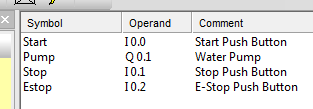
Save your changes by closing the Symbolic Table Editor.
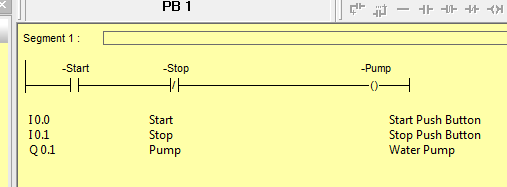
You can now select to see the symbols in your logic using the "presentation" menu, which is available whenever a block is open. "Displaying symbols below segment" and "Display symbolic operands" were chosen to produce the following example...