![SWTB_logo_rgb_color_mode-wPadding-2000x961.png]](https://help.softwaretoolbox.com/hs-fs/hubfs/SWTB_General/Images/Press_Kit/SWTB_logo_rgb_color_mode-wPadding-2000x961.png?height=50&name=SWTB_logo_rgb_color_mode-wPadding-2000x961.png)
There are three ways to view a Siemens program:
- Ladder (LAD)
- Control System Flowchart (CSF)
- Statement List (STL)
You can select the views using the Presentation menu, which is available when editing a block.

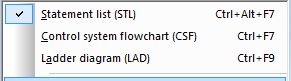
You can also use the shortcut keys (listed on the menu) while the block editor has focus to change views.
More information about S5/S7 for Windows and other IBH software can be found here.