![SWTB_logo_rgb_color_mode-wPadding-2000x961.png]](https://help.softwaretoolbox.com/hs-fs/hubfs/SWTB_General/Images/Press_Kit/SWTB_logo_rgb_color_mode-wPadding-2000x961.png?height=50&name=SWTB_logo_rgb_color_mode-wPadding-2000x961.png)
I'm running V3.2.0.10 or older and if I try to start OmniServer as a service in a newer operating system such as Windows Server 2008 R2, it fails with the message that a dependent service is not running, namely the Network DDE service.
How can OmniServer run as a service these newer operating systems?
For V3.2.0.10 and previous, the reason for this error is that NetDDE is no longer available in operating systems newer than Windows XP or Server 2003. By default, these versions of OmniServer were installed with NetDDE enabled as a dependency service.
However, there is a checkbox setting under View -> Runtime Options called "Disable NetDDE dependence" that will remove this dependency when checked. Check that setting and you should then be able to start OmniServer as a service.
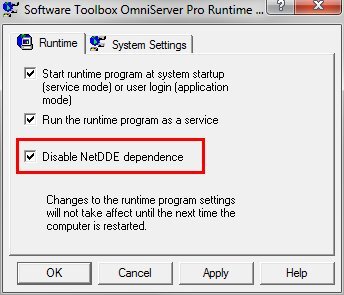
Starting with V3.2.0.11 and newer, the NetDDE dependency has been removed, so user simply need to go to View -> Runtime Options and enable the "Run the runtime program as a service" setting and restart the runtime to enable OmniServer to run as a Windows service.
.png?width=340&height=294&name=Screenshot_OmniServer_RunAsAService_NewerVersions(1).png)