![SWTB_logo_rgb_color_mode-wPadding-2000x961.png]](https://help.softwaretoolbox.com/hs-fs/hubfs/SWTB_General/Images/Press_Kit/SWTB_logo_rgb_color_mode-wPadding-2000x961.png?height=50&name=SWTB_logo_rgb_color_mode-wPadding-2000x961.png)
For TOP Server V6.10 and Previous: All S7-1200 and S7-1500 model controllers need to be set according to the following instructions in order to communicate with TOP Server using Siemens S7 Ethernet driver. If you are receiving a "Device returned protocol error [Class=0x81, Code=0x04]" message in the TOP Server Event Log, please make sure these settings have been verified.
For TOP Server V6.1 and Newer: This FAQ does not apply if you are using the OPC UA Client driver to connect to the OPC UA Server in the S7-1500.
For TOP Server V6.11 and Newer: This FAQ also does not apply if you are using the Siemens S7 Plus Ethernet driver (available in the Siemens Plus Suite and Manufacturing Suite).
The S7-1500 has an embedded Ethernet port which supports the S7 Communications over Ethernet protocol. TOP Server can communicate using this Siemens Native Ethernet protocol using the TOP Server Siemens S7 Ethernet driver, with some limitations described later in this tech note. Starting with Version 5.14 or newer (including the current V6 family), TOP Server added a new device model in the S7 Ethernet driver for the S7-1500. Older versions 5.12 and 5.13 of TOP Server support Siemens S7-1500 devices using the S7-1200 model.
The S7-1500 PLC also supports an optional OPC UA server interface in the PLC. The TOP Server OPC UA Client Driver, which is part of the TOP Server Siemens Plus Suite, can connect to that OPC UA interface, which provides additional capabilities that are not available via Siemens Native Ethernet .
For TOP Server to be able to communicate, the S7-1200 and S7-1500 controller using Siemens Native Ethernet must be set to permit access from the server. To do this perform the following steps in TIA Portal:
- Open the PLC project in the S7 TIA Portal software.
- Navigate to the PLC Properties. On the General Tab of the Properties page select Protection. Ensure that the "Full access (no protection)" radio button is selected. (The Siemens TCP/IP Ethernet driver does not currently support the use of a password.) Check the "Permit access with Put/Get communication from remote partner" check box.
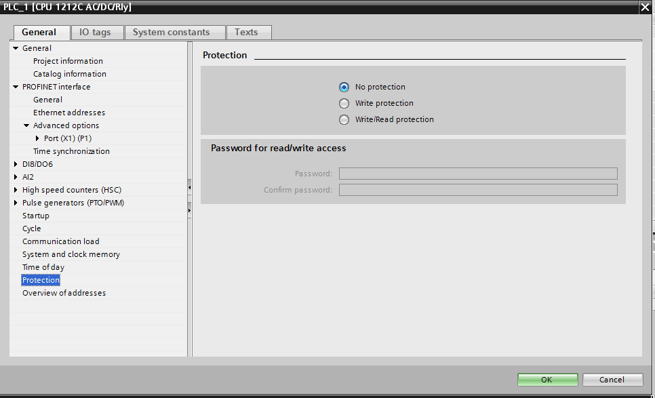
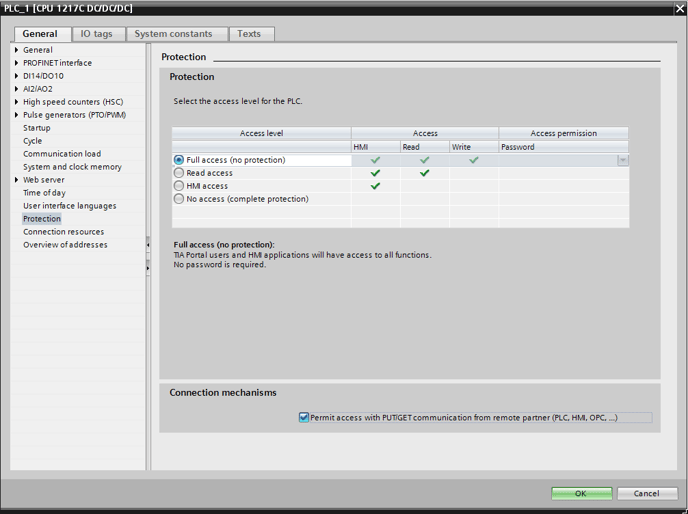
- Ensure that any Data Blocks that need to be accessed have the "Accessible from HMI" box enabled.
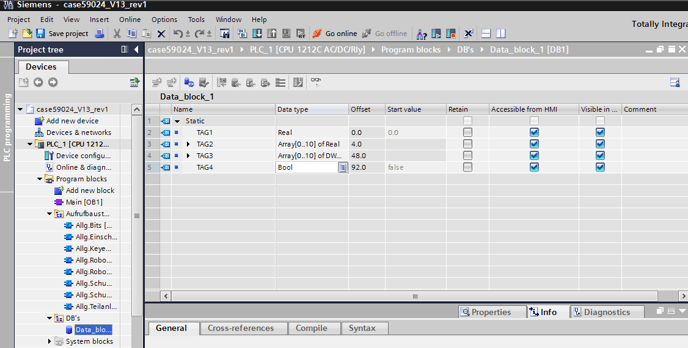
- Ensure that any Data Blocks that need to be accessed have "Optimized block access" disabled.
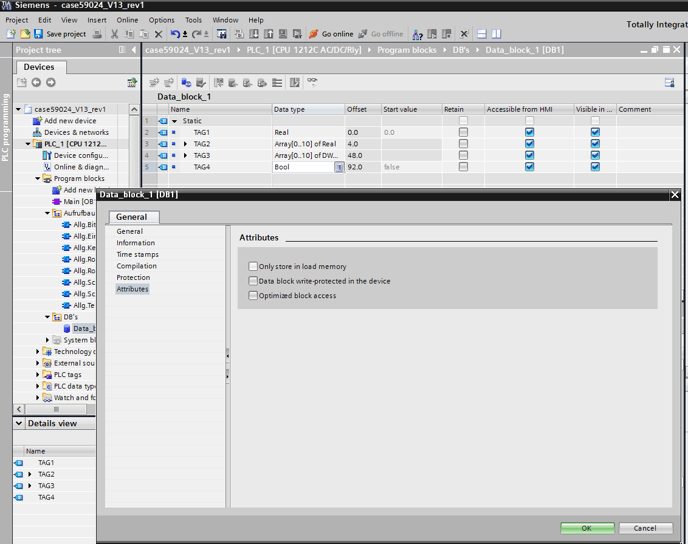
- Save these settings.
- Re-upload the project to the controller. It may also be necessary to cycle the power on the controller.
If the error persists, please repeat step 6 but delete the project from the PLC and then upload the project file again.
OPC UA only features: In order to use the following addressing features in the S7-1500 you must use the TOP Server Siemens Plus Suite and connect to the OPC UA Server in the S7-1500, which must be configured and enabled in the PLC. This is the officially Siemens and endorsed method for any non-Siemens party to access these features:
- Addressing Structures. With Siemens Native Ethernet (non-OPC UA) connections, individual addresses or arrays of addresses can be accessed, but not an entire structure.
- Tag based/named/optimized access (i.e. symbolic addressing)