![SWTB_logo_rgb_color_mode-wPadding-2000x961.png]](https://help.softwaretoolbox.com/hs-fs/hubfs/SWTB_General/Images/Press_Kit/SWTB_logo_rgb_color_mode-wPadding-2000x961.png?height=50&name=SWTB_logo_rgb_color_mode-wPadding-2000x961.png)
I am using the TOP Server ABB Totalflow driver to communicate with a device using the DB2 protocol. I am unable to write to any of the Characteristic Items (Last Volume Period (LVP) Tags, Current Measurement Tags, and Device Setup Tags.) These items default to "read-only" in the TOP Server project.
The Characteristic Items are "read-only" because they are all blocked together. Writing to one tag would mean writing to all of the tags. While it's not impossible, this would require a read-modify-write operation, or something similar, for the entire block of registers.
If communicating with a device using the DB2 protocol, then there is a workaround in that this address can also be accessed with register-based addressing. These would be accessed using the form <application>.<array>.<register>. In an example device shown in the screenshot below, CO2 gas quality data can also be accessed with the address 11.3.22.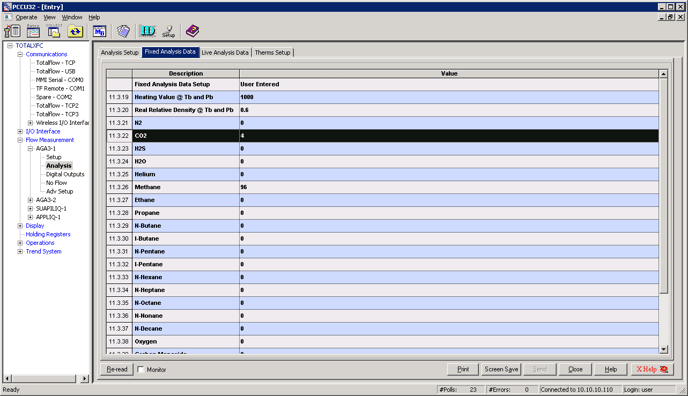
The registers are assigned by PCCU. In order to determine the register-based addressing for a particular DB2 device, it is necessary to look at PCCU to determine the <application>.<array>.<register> assignment.