![SWTB_logo_rgb_color_mode-wPadding-2000x961.png]](https://help.softwaretoolbox.com/hs-fs/hubfs/SWTB_General/Images/Press_Kit/SWTB_logo_rgb_color_mode-wPadding-2000x961.png?height=50&name=SWTB_logo_rgb_color_mode-wPadding-2000x961.png)
A virtual network allows devices from different channels to behave in a round robin manner. It accomplishes this by limiting data transmissions to one channel at a time.
You can configure more than one virtual network at a time. Simply select which virtual network to use on a specified channel and set the transaction cycle. The transaction cycle will refer to the amount of transmits and receives the channel is allowed to perform when it is permitted to communicate.
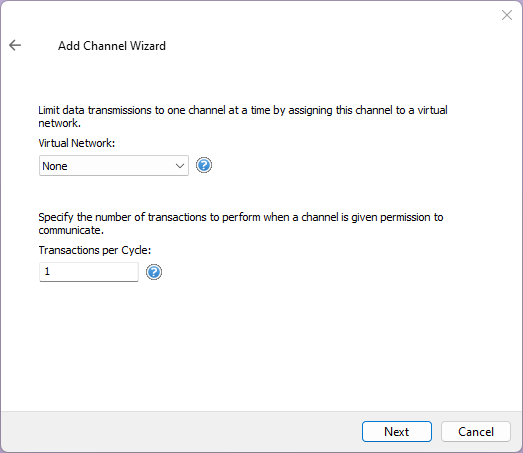
As seen in the screenshot above the virtual network can be selected by clicking the drop-down box. The transactions per cycle can be set by specifying a number.
For example, if ‘Channel1’, ‘Channel2’, and ‘Channel3’ are all on the same virtual network ‘Network1’ then the communication behavior is as so:
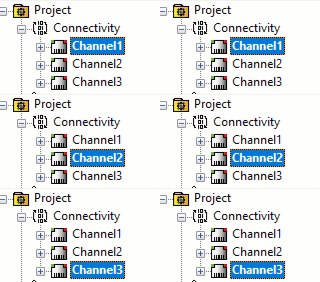
In the screenshots above the highlighted channels are the only channels that are attempting a transaction.
Virtual networks can improve and control radio modem communications as well as control the amount of bandwidth being used.