![SWTB_logo_rgb_color_mode-wPadding-2000x961.png]](https://help.softwaretoolbox.com/hs-fs/hubfs/SWTB_General/Images/Press_Kit/SWTB_logo_rgb_color_mode-wPadding-2000x961.png?height=50&name=SWTB_logo_rgb_color_mode-wPadding-2000x961.png)
[PDF version here]
Table of Contents
- Introduction
- Configuring your Device Connection
- Addressing
- Optimizing your Communications
- Conclusion
Introduction
The Simatic/TI 505 Ethernet Driver provides an easy-to-configure, robust, way to communicate with your Simatic/TI 505 devices. The driver supports communications with Simatic 505 Programmable Logic Controllers, and supports TCP/IP and UDP communications via CAMP and CAMP Packed Task Code Protocols.
This document gives a brief overview of how to configure a connection to your Ethernet Controllers, discusses the variety of addresses that are supported, and covers how to optimize your communications.
This document is not intended to serve as a comprehensive guide to the Simatic/TI 505 Ethernet Driver, or the mentioned protocols. The appropriate documentation should be consulted for a more detailed explanation, and the TOP Server help file should be used to provide a more comprehensive description of all the features the driver has to offer. The Help File can be accessed from within TOP Server at Help ⇒ Driver Help … ⇒ Simatic/TI 505 Ethernet.
Configuring your Device Connection
The TOP Server Simatic/TI 505 Ethernet driver supports communications with several communication cards and devices:
| Interface | Maximum Simultaneous Connections | Considerations/Comments |
| CTI 2572 | 8 | Can be set through Start Network command, or PLC Logic. DIP Switch 3 in Switch Block 2 Enables/Disables the Data Share feature. When enabled connections are limited to 2. |
| CTI 2572-A | 8 | Can be set through Start Network Server command, or EEPROM. DIP Switch 3 in Switch Block 2 Enables/Disables the Data Share feature. When enabled connections are limited to 2. |
| CP2572 | 8 | Can be set through Start Network Server command, or PLC Logic. DIP Switch 3 in Switch Block 2 Enables/Disables the Data Share feature. When enabled connections are limited to 2. |
| CP1434 | User Configurable | Via the CP1434 configuration Utility – configure the Job Type to be a UDP Server. The local port and maximum number of connections are then user configurable |
| CTI 2500 | 3 (TCP Only) | Can connect using TCP port 4450 or 1505, no UDP Connections |
In order to establish communications to a device in the list above, a TOP Server channel and device must be configured. During Channel Configuration the channel can be assigned a user configurable name, and the Simatic/TI 505 Ethernet Driver should be selected as the communications driver. The appropriate network adapter should be selected – unless it is known to be different, keeping this at the default value should be appropriate.
To finish up the channel setup; the write optimizations, and non-normalized value handling should be configured. The write optimization dialog allows configuration of how many writes are performed per read, and how these writes should be optimized – for further optimization considerations refer to the optimization section of this document. The final dialog of the channel setup allows for configuration of how non-normalized values are passed to client applications – “Replaced with zero” replaces any non-normalized (e.g. infinity, non-a-number) with a 0.
Where the channel setup configures the communications path to the device, the device configuration allows for device specific settings to be set. After naming the device, the device model should be selected. The model corresponds to the communications interface that will be used when connecting to the controller - it is vital that this is accurate.
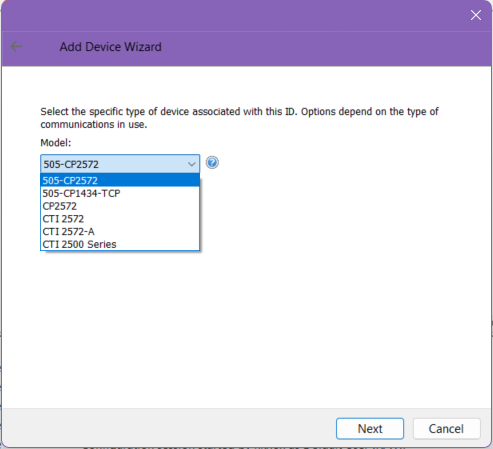
The Device ID will correspond to the IP address that is configured for the communications card – pinging the IP address is an easy way of verifying that TOP Server will be able to establish a socket connection to the controller. On the following dialog, the scan mode can be set. It is recommended to keep this at “Respect client specified scan rate” unless it is known that a different scan method is required. The Timing section will configure the timeout settings, as well as determining how many times to retry a device before failing.
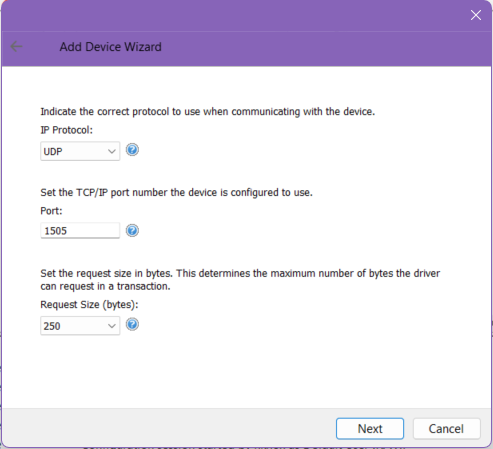
On the Communications Parameters dialog, the communication port, IP Protocol, and maximum Request size can be configured. These settings are vital in order to establish a successful socket connection to the communications card. The port number is configurable on the communications card, and must match what is used by TOP Server. The Request size determines the maximum number of bytes that can be requested by TOP Server in one transaction, and must match the card used. The maximum value is 250 bytes – a limitation of the NITP protocol.
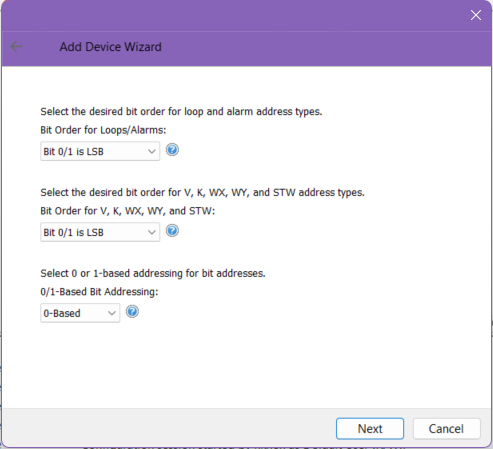
Following the Communications Parameters, the Bit Order options allow for configuration of how the data will be presented in TOP Server. The 0/1 Based bit addressing will determine the starting address when referencing addresses at the Boolean level. 0-Based allows for addressing bits 0-15, and 1-Based allows for addressing bits 1-16. The bit order options allow configuration of the order that bits are interpreted in, when coming from the controller
In a situation where you are receiving good values, but the value is not the one that is expected, please verify that these settings are correct.
These options can also be set to match some legacy products; Bit 0/1 is MSB corresponds to the configuration required for the TICVU I/O Server, and Bit 0/1 is LSB corresponds to the configuration of the TI Direct I/O Server (TIDIR).
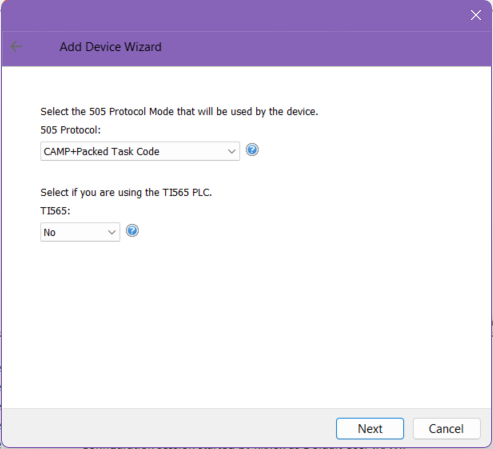
The final dialogue will allow configuration of the 505 protocol that will be used when communicating with the controller. The protocol options are CAMP, or CAMP+Packed Task Code and controls the message structure of any packets sent to the controller. Further considerations and protocol specific information is discussed in the addressing, and optimization section of the document. The TI565 box should be checked only if using a TI565 Controller.
Addressing
Addressing Syntax
The address range given will vary depending on the controller used – if an address is not valid for a given controller, TOP Server will throw an error and remove the tag from the scan cycle. For a complete list of supported addresses please refer to the tables in the Common Data Type Addressing section of the TOP Server Help File. The general address syntax will take to form of:
<MemorySpace><Address>
Reading registers as arrays is also supported by appending [rows][columns] to the end of the address. There are several memory types that are not supported when using Packed Task Code Protocol. These are:
- Drum Count Preset (DCP)
- Discrete Input (X)
- Discrete Output (Y)
- Discrete Control (C or CR)
- Addresses greater than '30720' for Drum Step Preset (DSP) and Drum Step Current (DSC)
For these addresses, CAMP Protocol will be used instead.
Addressing Status Words
For all status words, the most significant bit is the first bit (starting from the left), and 0/1 based addressing can be configured during device configuration. For a complete list of status words that are supported for various interfaces, please reference the Status Words section of the TOP Server Simatic/TI 505 Help File.
Addressing Alarms
The address range given will vary depending on the controller used – if an address is not valid for a given controller, TOP Server will throw an error and remove the tag from the scan cycle.
| Address Type | Format | Range | Default Data Type |
|---|---|---|---|
| Alarm Status (V) Flags | AVF<address> | 1-65536 | Word |
| Alarm Control (C) Flags | ACF<address> | 1-65535 | DWord |
| Alarm PV High Alarm | APVH<address> | 1-65535 | Float |
| Alarm PV Low Alarm | APVL<address> | 1-65535 | Float |
| Alarm Process Variable | APV<address> | 1-65535 | Float |
| Alarm High Limit | AHA<address> | 1-65535 | Float |
| Alarm Low Limit | ALA<address> | 1-65535 | Float |
| Alarm Orange Deviation Alarm | AODA<address> | 1-65535 | Float |
| Alarm Yellow Deviation Alarm | AYDA<address> | 1-65535 | Float |
| Alarm Sample Rate | ATS<address> | 1-65535 | Float |
| Alarm Setpoint | ASP<address> | 1-65535 | Float |
| Alarm Error | AERR<address> | 1-65535 | Float |
| Alarm High High Alarm Limit | AHHA<address> | 1-65535 | Float |
| Alarm Low Low Alarm Limit | ALLA<address> | 1-65535 | Float |
| Alarm Rate of Change Alarm | ARCA<address> | 1-65535 | Float |
| Alarm Setpoint High Limit | ASPH<address> | 1-65535 | Float |
| Alarm Setpoint Low Limit | ASPL<address> | 1-65535 | Float |
| Alarm Alarm Deadband | AADB<address> | 1-65535 | Float |
| Alarm Raw High Alarm Limit | AHAR<address> | 1-65536 | Word |
| Alarm Raw Low Alarm Limit | ALAR<address> | 1-65536 | Word |
| Alarm Raw Process Variable | APVR<address> | 1-65536 | Word |
| Alarm Raw Orange Deviation | AODAR<address> | 1-65536 | Word |
| Alarm Raw Yellow Deviation | AYDAR<address> | 1-65536 | Word |
| Alarm Raw Setpoint | ASPR<address> | 1-65536 | Word |
| Alarm Raw Alarm Deadband | ADBR<address> | 1-65536 | Word |
| Alarm Raw Error | AERRR<address> | 1-65536 | Word |
| Alarm Raw High-High Alarm Limit | AHHAR<address> | 1-65536 | Word |
| Alarm Raw Low-Low Alarm Limit | ALLAR<address> | 1-65536 | Word |
| Alarm Raw Setpoint Low Limit | ASPLR<address> | 1-65536 | Word |
| Alarm Raw Setpoint High Limit | ASPHR<address> | 1-65536 | Word |
| Alarm MSW Alarm C Flags | ACFH<address> | 1-65536 | Word |
| Alarm LSW Alarm C Flags | ACFL<address> | 1-65536 | Word |
| Alarm ACK Flag | AACK<address> | 1-65536 | Word |
The following alarm address types are not supported when using Packed Task Code Protocol. CAMP Protocol will be used instead.
|
|
Please refer to the optimization section for more details on how this can impact communications. For a comprehensive list of Loop addresses please refer to the appropriate section of the TOP Server Help File
Addressing Loops
| Address Type | Format | Range | Default Data Type |
|---|---|---|---|
| Loop Gain | LKC<address> | 1-65535 | Float |
| Loop Reset Time (min.) | LTI<address> | 1-65535 | Float |
| Loop Rate Time (min.) | LTD<address> | 1-65535 | Float |
| Loop High Alarm Limit | LHA<address> | 1-65535 | Float |
| Loop Low Alarm Limit | LLA<address> | 1-65535 | Float |
| Loop Process Variable | LPV<address> | 1-65535 | Float |
| Loop PV High Limit | LPVH<address> | 1-65535 | Float |
| Loop PV Low Limit | LPVL<address> | 1-65535 | Float |
| Loop Orange Dev Alarm Limit | LODA<address> | 1-65535 | Float |
| Loop Yellow Dev Alarm Limit | LYDA<address> | 1-65535 | Float |
| Loop Sample Rate | LTS<address> | 1-65535 | Float |
| Loop Setpoint | LSP<address> | 1-65535 | Float |
| Loop Output (%) | LMN<address> | 1-65535 | Float |
| Loop Status (V) Flags | LVF<address> | 1-65536 | Word |
| Loop Control (C) Flags | LCF<address> | 1-65535 | DWord |
| Loop Ramp/Soak Status Flags | LRSF<address> | 1-65536 | Word |
| Loop Error | LERR<address> | 1-65535 | Float |
| Loop Bias | LMX<address> | 1-65535 | Float |
| Loop High-High Alarm Limit | LHHA<address> | 1-65535 | Float |
| Loop Low-Low Alarm Limit | LLLA<address> | 1-65535 | Float |
| Loop Rate of Change Alarm Limit | LRCA<address> | 1-65535 | Float |
| Loop Setpoint High Limit | LSPH<address> | 1-65535 | Float |
| Loop Setpoint Low Limit | LSPL<address> | 1-65535 | Float |
| Loop Alarm Deadband | LADB<address> | 1-65535 | Float |
| Loop Raw High Alarm Limit | LHAR<address> | 1-65536 | Word |
| Loop Raw Low Alarm Limit | LLAR<address> | 1-65536 | Word |
| Loop Raw Process Variable | LPVR<address> | 1-65536 | Word |
| Loop Raw Orange Dev Alarm Limit | LODAR<address> | 1-65536 | Word |
| Loop Raw Yellow Dev Alarm Limit | LYDAR<address> | 1-65536 | Word |
| Loop Raw Output | LMNR<address> | 1-65536 | Word |
| Loop Raw Setpoint | LSPR<address> | 1-65536 | Word |
| Loop Raw Error | LERRR<address> | 1-65536 | Word |
| Loop Raw High-High Alarm Limit | LHHAR<address> | 1-65536 | Word |
| Loop Raw Low-Low Alarm Limit | LLLAR<address> | 1-65536 | Word |
| Loop Raw Alarm Deadband | LADBR<address> | 1-65536 | Word |
| Loop Raw Bias | LMXR<address> | 1-65536 | Word |
| Loop Raw Setpoint Low Limit | LSPLR<address> | 1-65536 | Word |
| Loop Raw Setpoint High Limit | LSPHR<address> | 1-65536 | Word |
| Loop C Flags - MSW | LCFH<address> | 1-65536 | Word |
| Loop C Flags - LSW | LCFL<address> | 1-65536 | Word |
| Loop Derivative Gain Limit Coef. | LKD<address> | 1-65535 | Float |
| Loop Ramp/Soak Step Number | LRSN<address> | 1-65536 | Word |
| Loop Alarm ACK Flags | LACK<address> | 1-65536 | Word |
The following loop address types are not supported when using Packed Task Code Protocol. CAMP Protocol will be used instead.
|
|
Please refer to the optimization section for more details on how this can impact communications. For a comprehensive list of Loop addresses please refer to the appropriate section of the TOP Server Help File.
Finding Forced Addressing
The TOP Server Simatic/TI 505 Ethernet driver supports the ability to find forced addresses in the controller:
| Address Type | Format | Range | Default Data Type |
|---|---|---|---|
| Find Forced Discrete Starting at X address | FFX | N/A | String |
| Find Forced Discrete Starting at Y address | FFY | N/A | String |
| Find Forced Discrete Starting at C address | FFC | N/A | String |
| Find Forced Word Starting at WX address | FFWX | N/A | String |
| Find Forced Word Starting at WY address | FFWY | N/A | String |
| Find Forced Discrete / Word Starting address | FFSTART | N/A | DWord |
These addresses can be used to find forced addresses in a specific address space by:
- Writing to FFSTART to set the address that the search algorithm with start at
- Performing a read of one of the other addresses to perform a search for any forced address in that range.
The search will return a string of all forced addresses in that range. For more detailed instructions on how these addresses can be used please refer to the Find Forced Addressing section of the TOP Server help file.
Optimizing your Communications
TOP Server Ethernet drivers are extremely efficient in handling communications with configured devices, but further steps can be taken to improve this performance even further. The Simatic/TI 505 Ethernet driver offers several ways of optimizing the communication to the controller. These can be divided into two categories; opportunities for optimization through ideal project configuration, and optimization at a protocol level.
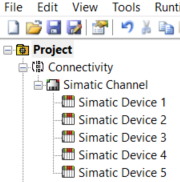 With the creation of a Channel in TOP Server, a new path of execution is configured in the server – allowing for communications with multiple devices simultaneously. With several Ethernet devices configured under a single channel, polling will be done sequentially – a device only being polled if all tags for preceding devices have been polled. This can
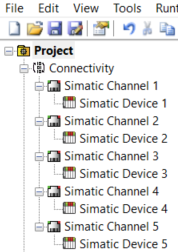 cause issues depending on the number of devices on the channel, and if a single device experiences communication problems, all other channels will be negatively affected as the problematic device goes through its configured timeout periods.
Since the TOP Server Simatic/TI 505 Ethernet driver supports up to 100 configured channels, devices would ideally be evenly divided between channels. This would establish avenues of communications to each device, and allow for simultaneous communications. You can take advantage of this by creating two or more channels and devices connecting to the same device for better through-put if needed (see the Configuring Your Device section above for connection limitations). If more than 100 devices are being configured, they should be evenly spread between the 100 possible channels. If there are specific tags that are expected to be written to much more than others, it is recommended that these are moved to their own Channel/Device. This configures “write heavy” tags in a separate connection to the device, making sure that reads are not slowed down by a large number of writes - since writes take precedence over reads. Further considerations that should be taken into account when dividing devices between channels are discussed below.
Protocol Mode Settings
The TOP Server Simatic/TI 505 driver has the ability to further optimize communications. The ability to set the protocol mode that is used for each device – CAMP, or CAMP+Packed Task Code – optimizes the message structure that is used when communicating with the device.
The Common ASCII Message Protocol (CAMP) is the communications protocol that most CTI modules utilize to transfer data. It is limited to 256 words per message, and requests for single data type. Reading 10 memory locations from the V range, 10 locations from the WX Range, 10 locations from the WY range, and 2 loop processes, would require 4 separate messages to be sent to the device to request the data – 1 for each of the 4 memory locations.
When Packed Task Code is selected, the protocol allows for multiple NITP task codes to be placed into a single message. Reading 10 memory locations from the V range, 10 locations from the WX Range, 10 locations from the WY range, and 2 loop processes, would require 1 message to be sent to the device to request the data. Since Packed Task Code allows for up to 14 NITP task codes to be placed into a single message, the 4 memory locations could be read in a single request.
From an optimization stand point it would seem like every device should be configured to use CAMP+Packed Task Code. This could be true, if all address types were supported by Packed Task Code - ideally devices would not only be divided under individual channels, but tags for a single device would be further divided based on whether they support Packed Task Code.
Address types that are not supported include:
- Arrays
- Strings
- Address types that are not supported – e.g. DCP
- Address ranges greater than 36 contiguous addresses e.g. V1 through V38
Since the Ethernet modules support multiple, simultaneous, connections; each device should have two Channel/Device pairs configured, one for addresses that do not support Packed Task Code, and one for addresses that do support it. Whether the controller will support simultaneous connections will depend on the specific controller used, and how many connections are already being made – please see the list of supported interface cards, in the “Configuring your Device Connection” section, for the maximum number of simultaneous connections that can be made to a controller.
Conclusion
This document was designed to provide and end-user of the TOP Server Simatic/TI 505 Ethernet driver a guide to aid with the configuration, optimization, and troubleshooting of a project utilizing one of the aforementioned communication interfaces. This document was intended to give a high-level oversight of the driver, and in no way should serve as a comprehensive reference tool when dealing with Simatic/TI 505 devices or communication problems.
For further questions the TOP Server help file should be referred to, and documentation specific to the Common ASCII Message Protocol, and Packed Task Code, is available online.
Please, also, refer to our collection of TOP Server Application Notes which are available on our Support website: https://help.softwaretoolbox.com/faq/top-server#application-notes
If you have further questions or need assistance, our experienced staff is more than happy to help. We can be reached via:
|
Online Support Email Support Phone Support Fax |