![SWTB_logo_rgb_color_mode-wPadding-2000x961.png]](https://help.softwaretoolbox.com/hs-fs/hubfs/SWTB_General/Images/Press_Kit/SWTB_logo_rgb_color_mode-wPadding-2000x961.png?height=50&name=SWTB_logo_rgb_color_mode-wPadding-2000x961.png)
It is possible to use a simple binding to control the upper and lower limits of the Trend Chart Y-axis.
Example (Using either a 3 Pen or 8 Pen Trend and a Text Entry Field) :
Trend Chart ⇒ Y Axis Properties ⇒ Value Range ⇒ Binding: Simple
- Using the property picker of Simple Binding, click on the Text Entry field and select Basic Properties ⇒ Input value. This will associate any value that you enter into the Text Field to the Y Axis (upper and lower limit).
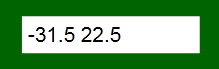
This requires a syntax of <lower limit> <upper limit> where the upper and lower limit are numeric value separated by a space.