![SWTB_logo_rgb_color_mode-wPadding-2000x961.png]](https://help.softwaretoolbox.com/hs-fs/hubfs/SWTB_General/Images/Press_Kit/SWTB_logo_rgb_color_mode-wPadding-2000x961.png?height=50&name=SWTB_logo_rgb_color_mode-wPadding-2000x961.png)
Introduction
The DNP3 protocol is an incredibly powerful and flexible protocol. It was designed to be versatile and provide accurate and reliable data in a large number of critical infrastructures. The TOP Server DNP Driver is a level 3 DNP3 client, and offers a number of advanced use options.
This document is intended to discuss several of the advanced use options available with the DNP Client Ethernet Driver, specifically, the control relay output block (CROB) commands for binary and analog output groups. This document is in no way intended to give an overview of the DNP3 protocol specifications, or give a comprehensive guide to using the TOP Server DNP3 Client Ethernet driver. The settings that will be discussed will be those that specifically impact CROB operations.
For a general guide on using the TOP Server, or specifically the DNP Client Ethernet Driver, reference the appropriate help file and see our collection of application notes and videos:
- TOP Server Quick Start guide: https://blog.softwaretoolbox.com/video-tutorial-topserver-quick-start
- TOP Server Support Site: https://help.softwaretoolbox.com/faq/top-server
- TOP Server Application Notes: https://help.softwaretoolbox.com/faq/top-server#application-notes
- TOP Server Videos: https://info.softwaretoolbox.com/topserver-videos
For further information on the DNP3 Protocol Specifications please reference the DNP Organization website: www.dnp.org
TOP Server DNP3.0 Settings
The TOP Server 6 DNP3 Client Ethernet Driver allows for device-level configuration of key settings that impact the configured behavior for an entire device. The Device Properties' Advanced tab allows for configuration of the devices global operate mode setting, as well as whether the driver should perform a feedback poll after a write.
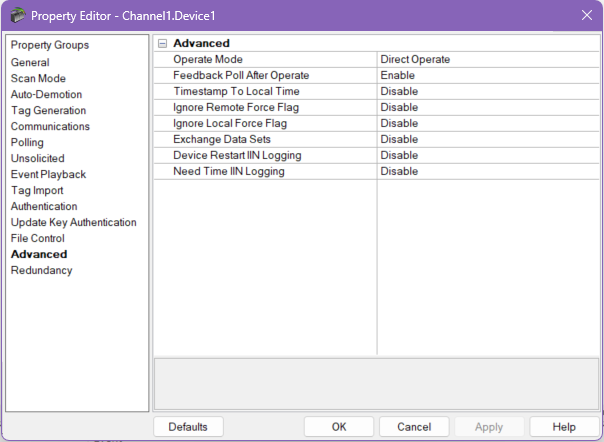
Operate Mode
The Operate Mode specifies the operation sequence to use when operating on binary (object group 10) and analog (object group 40) output points. The setting here is global to the device. Tag-specific settings are available by using the .DO and .SO attributes, which will be discussed later in this document.
Direct Operate
The default setting, Direct Operate, allows for immediate operation on output points without further checks or validation. While it does not provide the additional security of "Select then Operate", it optimizes bandwidth utilization by minimizing traffic between the RTU and Client. Because the confirmation received from the Server station after a Direct Operate command does not guarantee successful execution, it is recommended to utilize some other form of validation.
Select then Operate
Where Direct Operate optimizes bandwidth utilization, Select then Operate adds an additional layer of security by helping to prevent unintended changes of output points. Select then Operate breaks a write into two distinct transactions:
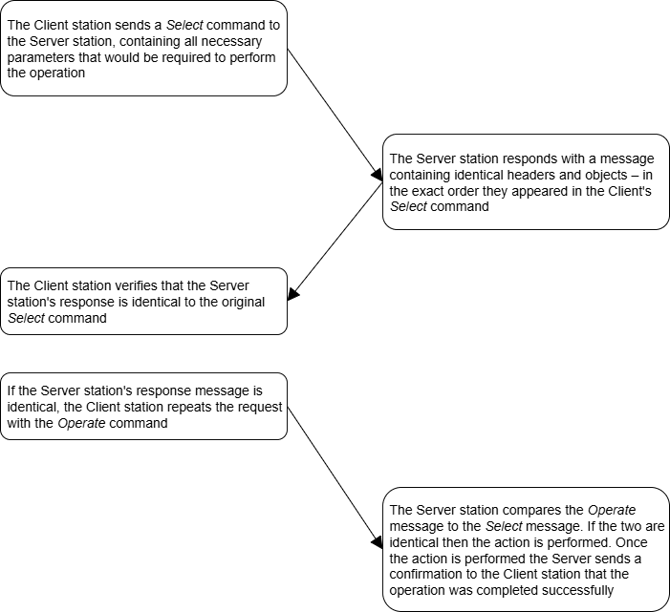
Because the Server station would only have performed the operation if the Operate command matched the original Select command, the confirmation from the Server station indicates that the intended operation was performed successfully.
Feedback Poll after Operate
The Feedback Poll after Operate setting enables a poll of the output group that was just written to. Performing a write to a Binary Output Point would result in a feedback poll of all binary output points. This serves to confirm a successful operate in situations where additional data validity checks are required, and to confirm the current status of all data points in groups that were just operated on.
The Binary Output Object Group
The DNP3 protocol specifies Object Group 10 for reading the current output state and Object Group 12 for Control Operations on the Binary Output Points. In TOP Server, both cases will be addressed by using Object Group 10. Performing an operation on object group 10 will issue the CROB command using Object Group 12, variation 1.
Binary Output – Output Models
Binary Output points will fall into one of three output models, which are important to understand in determining what effect a control command will have on the specified output:
- Activation – The simplest, it initiates an action on a single output point.
- Complementary Latch – This will affect a single output, which will remain latched in an active or inactive state.
- Complementary Two-Output – This output model has two virtual outputs at a single index – trip and close. Either state is set active momentarily (Pulsed) based on the control code received. The device manufacturer is expected to assign device appropriate control codes (I.e. Pulse On trip/close for a breaker, and latch on/off for a pseudo point.)
CROB Command Attributes
Unlike a typical write, where a client application simply changes the value of the desired tag, Control Relay Output Block commands must get constructed in TOP Server, locally, prior to triggering a transmission to the device. A number of tag attributes exist in TOP Server to construct CROB Commands:
Attribute |
Description |
|---|---|
10.x.y.DO |
The DO attribute designates the operate mode for output point (y) as being Direct Operate, overwriting the device level operate setting for point y. Writing to this tag will not trigger a write to the Server station, and will not affect the device level operate settings. The value of this tag will only be used when performing an explicit write to the outstation, using the 10.x.y.Value or 10.x.y.Explicit addresses. |
10.x.y.SO |
The SO attribute designates the operate mode for output point (y) as being Select then Operate, overwriting the device level operate setting for point y. Writing to this tag will not trigger a write to the Server station, and will not affect the device level operate settings. The value of this tag will only be used when performing an explicit write to the outstation, using the 10.x.y.Value or 10.x.y.Explicit addresses. |
10.x.y.Operate.Clear |
The Operate.Clear attribute will change the Clear bit in the Control Code sent to the outstation. Writing to this tag will not trigger a write and will be stored locally until the Operate.Set command is used to send the CROB command to the outstation. Valid values are 0 or 1 |
10.x.y.Operate.OnTime |
The Operate.OnTime attribute sets the time (in milliseconds) that the CROB command will remain active on the binary output point. Writing to this tag will not trigger a write to the outstation; it will change the value of the corresponding four bytes in the Data object sent to the device when the Operate.Set command is written to. With a DWORD Data Type the valid range is 0 to 4,294,967,295ms (~49 days and 17 hours) |
10.x.y.Operate.OffTime |
The Operate.OffTime attribute sets the time (in milliseconds) that the CROB command will remain non-active on the binary output point. Writing to this tag will not trigger a write to the outstation; it will change the value of the corresponding four bytes in the Data object sent to the device when the Operate.Set command is written to. With a DWORD Data Type the valid range is 0 to 4,294,967,295ms (~49 days and 17 hours) |
10.x.y.Operate.OpType |
The Operate.OpType attribute will change the operation type in the Control Code sent to the outstation. Writing to this tag will not trigger a write to the outstation and will be stored locally until the Operate.Set command is used to send the CROB command to the outstation. Valid values are: 0 – Null 1 – Pulse On 2 – Pulse Off 3 – Latch On 4 – Latch Off |
10.x.y.Operate.TripCloseCode |
The Operate.TripCloseCode attribute will specify the values of the two corresponding bits in the Control Code sent to the outstation. Writing to this tag will not trigger an explicit write to the outstation; instead it will store the value locally until the Operate.Set command is used to issue the command. Valid values are: 0 – Null 1 – Paired Close 2 – Paired Trip |
10.x.y.Operate.FeedbackDelay |
The Operate.FeedbackDelay attribute sets the time (in milliseconds) that should be waited before issuing a feedback poll, after receiving a response from the outstation. Writing to this tag will not trigger a write to the outstation, but rather store the value in TOP Server. With a DWORD Data Type the valid range is 0 to 4,294,967,295ms (~49 days and 17 hours) |
10.x.y.Operate.Set |
The Operate.Set attribute will trigger the constructed CROB control code to be sent to the Server station. A client to TOP Server will always read the value to be 0 with good quality, but writing a 1 to this tag will issue an Object Group 12 control operation on Binary output point 'y'. |
10.x.y.OperateWithParams |
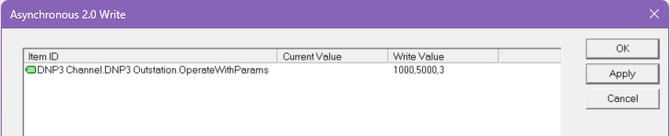
This subtype can be used to send a command to a Control Relay Output Block (CROB) and set each of the CROB values in a single write. The variation of the tag does not matter. Writing to this tag causes an Object Group 12 control operation on a binary output. The CROB control code is built from the string value written to the tag. It is a comma-separated list where the values are in the following order: OnTime, OffTime, OpType, TripCloseCode, Clear, FeedbackDelay. Values left out default to 0. |
CROB Command Example
This section will take a look at a CROB Command constructed in TOP Server and dissect the corresponding command that is sent to the outstation. Three tags were configured in TOP Server to control the OpType, the OnTime, the OffTime, and a fourth tag to trigger the transmission of the command to the outstation. A fifth tag was then configured to show how this can be done within a single write using OperateWithParams.

The Quick Client was used to set values for the tags:
- OpType – 3 (Latch On)
- OnTime – 1000 ms
- OffTime – 5000 ms

Once all values were preset, and the CROB command was constructed, the Set tag was written high (1) to trigger the transmission to the outstation. The following transmit and response sequence was initiated:

The command code, and object are highlighted in color above; for additional information on the additional headers that are not described here reference the DNP3 protocol specifications:
03 |
The Control Code, this breaks down to binary 00000100:
|
01 |
|
E8 03 00 00 |
|
88 13 |
|
CD 49 |
|
00 00 |
|
00 |
|
FF FF |
|
This can also be done by setting the following value:
OperateWithParams – 1000,5000,3
Server Station Actions
The table below details what action the outstation will take based on the constructed TOP Server CROB command when the Operate.Set tag is written high (1).
Trip Close Code |
OpType |
Clear |
Control Code |
Action |
|---|---|---|---|---|
| 0 – Null | 0 – Null | 0 | 0x00 | Nothing – No action will be taken |
| 0 – Null | 0 – Null | 1 | 0x20 | Cancels all commands that are currently being processed, or are queued for processing. On and Off times are ignored. |
| 0 – Null | 1 – Pulse On | 0 | 0x01 | Activation Output Model: The selected output point is set active for the value specified in the OnTime field. |
| 0 – Null | 1 – Pulse On | 1 | 0x21 | Activation Output Model: All pending or in-process actions are canceled. Then the selected output point is set active for the duration specified in the OnTime field. Complementary Latch Output Model: This action is not supported. Complementary Two-Output Output Model: This action is not supported. |
| 0 – Null | 3 – Latch On | 0 | 0x03 | Activation Output Model: The selected output is set active for the duration specified in the OnTime field. Complementary Latch Output Model: The selected output is set to active. Complementary Two-Output Output Model: The selected close output is set to active for the duration specified in the OnTime field. |
| 0 – Null | 3 – Latch On | 1 | 0x23 | All commands that are currently being processed, or are queued for processing, are canceled. Command code 0x03 is then processed. |
| 0 – Null | 4 – Latch Off | 0 | 0x04 | Activation Output Model: The selected output is set active for the duration specified in the OnTime field. Complementary Latch Output Model: The selected output is set to inactive. Complementary Two-Output Output Model: The selected trip output is set to active for the duration specified in the OnTime field. |
| 0 – Null | 4 – Latch Off | 1 | 0x24 | All commands that are currently being processed, or are queued for processing, are canceled. Command code 0x04 is then processed. |
| 1 – Close | 1 – Pulse On | 0 | 0x41 | Activation Output Model: The selected output is set active for the duration specified in the OnTime field. Complementary Latch Output Model: The selected output is set to active. Complementary Two-Output Output Model: The selected close output is set to active for the duration of the specified OnTime field. |
| 1 – Close | 1 – Pulse On | 1 | 0x61 | All commands that are currently being processed, or are queued for processing, are canceled. Command code 0x41 is then processed. |
| 2 – Trip | 1 – Pulse On | 0 | 0x81 | Activation Output Model: The selected output is set active for the duration specified in the OnTime field. Complementary Latch Output Model: The selected output is set inactive. Complementary Two-Output Output Model: The selected trip output is set active for the duration specified in the OnTime field. |
| 2 – Trip | 1 – Pulse On | 1 | 0xA1 | All commands that are currently being processed, or are queued for processing, are canceled. Command code 0x81 is then processed. |
Troubleshooting
The TOP Server makes troubleshooting problems sending control commands to the outstation extremely easy with specific, control related errors in the event log:
Unable to write to '<address>' on device '<device>'. Device does not support requested operation for objects in the request (IIN2.1)
- Cause – The Server station does not support the requested operation for the objects in the request
- Solution – Verify that the Server station supports the requested operation
Unable to write to '<address>' on device '<device>'. Device does not support the function code (IIN2.0)
- Cause – The Server station does not support the function code on the objects in the request
- Solution – For more information, refer to the Server station's documentation
Unable to write to '<address>' on device '<device>'. Device reports that some output points are in local mode (IIN1.5)
- Cause – Some output points are in local mode
- Solution – Correct the mode in the Server station's configuration and refer to the Server station's documentation for further information
Unable to write to '<address>' on device '<device>'. Select Operate response invalid
- Cause – The device did not return an acceptable response to a "Select then Operate" request
- Solution – Verify that the Server station is configured to operate on the selected point
Unable to write to '<address>' on device '<device>'. Control-Related Status Code '<status code>'
- Cause – The value written to the ".Operate" sub-type was not understood by the Server station
- Solution – Check the table below for the specific Control-Related Status Code that is referenced in the error
Known Issue: In certain circumstances, sending a Latch On command works, but sending a Latch Off command does not.
- Cause – Some devices may require you to write to one bit in order to send Latch On, and another to send Latch Off. This depends on the way the device was set up.
- Solution – Create a second tag in TOP Server which points to the Latch Off bit, or change the device to tie Latch On and Latch Off to the same bit.
Control-Related Status Codes
Code Number |
Description |
|---|---|
| 0 | Request accepted – This means the request has been initiated or queued for processing |
| 1 | Request not accepted because the operate message was received after the "armed" timer timed out. The "armed" timer was started when the select operation for the same point was received. |
| 2 | Request not accepted because no previous matching select request exists. An operate message was sent to activate an output that was not previously armed with a matching select message. |
| 3 | Request not accepted because there were formatting errors in the control request (select, operate, or direct operate). |
| 4 | Request not accepted because a control operation is not supported for this point. |
| 5 | Request not accepted because the control queue is full (or the point is already active). |
| 6 | Request not accepted because of control hardware problems. |
| 7 | Request not accepted because the Local/Remote switch is in the Local position. |
| 8 | Request not accepted because too many objects appeared in the same request. |
| 9 | Request not accepted because of insufficient authorization. |
| 10 | Request not accepted because it was prevented or inhibited by a local automation process. |
| 11 | Request not accepted because the device cannot process any more activities than are presently in progress. |
| 12 | Request not accepted because the value is outside the acceptable range permitted for this point. |
| 13 to 125 | Reserved for future use |
| 126 | Sent in request message, indicating that the outstation will neither issue nor perform the control Operation. |
| 127 | Request not accepted due to an undefined reason. |
Conclusion
This document has given an in-depth look at how to construct Control Relay Output Block Commands in TOP Server, the expected behavior when using these commands, some protocol level analysis of what happens when a successful command is issued, as well as how to troubleshoot problems when issuing control commands.
This document was intended to give a better understanding of how CROB commands work and how they can be used to optimize communications with a DNP Server station. In no way does this document cover or discuss the entirety of the TOP Server's setup, implementation, or abilities when communicating with a DNP Server using the DNP Client Ethernet Driver. This document is not intended to provide the same level of detail that can be found in the DNP3 Protocol Specifications.
For further information regarding the TOP Server DNP Client Ethernet driver, please reference the Help File found in your TOP Server installation or at:
If after reading this document, there are any further questions on using DNP Control Commands in TOP Server, or any assistance is required, our experienced staff is more than happy to help: