![SWTB_logo_rgb_color_mode-wPadding-2000x961.png]](https://help.softwaretoolbox.com/hs-fs/hubfs/SWTB_General/Images/Press_Kit/SWTB_logo_rgb_color_mode-wPadding-2000x961.png?height=50&name=SWTB_logo_rgb_color_mode-wPadding-2000x961.png)
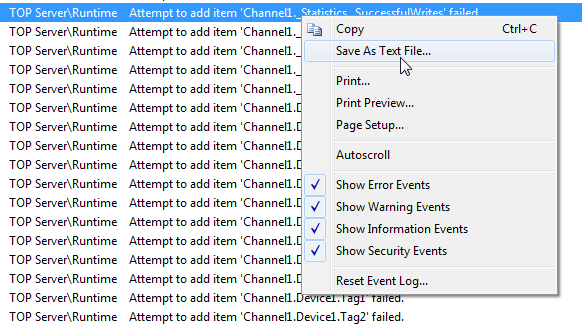
The TOP Server Event log can be exported as a text file.
-
Save the Event Log as a Text File
-
Copy the contents of the Text File to your clipboard
-
Open Excel and paste the contents of the Text File in cell A1. (this will paste each line of the event log on a separate line within the excel sheet)
-
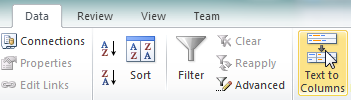
Highlight each cell of event data (A4-A#) and click the 'Text to Columns' button
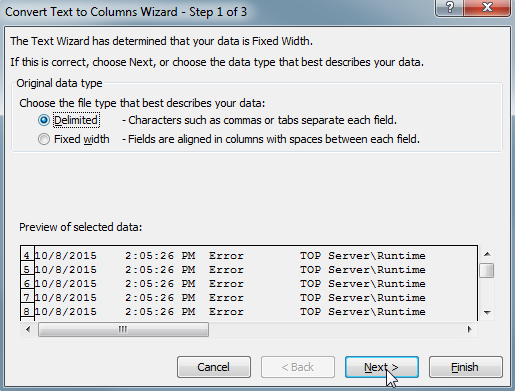
- Select Delimited conversion
- Use the Tab and Apostrophe (Other) delimiters to isolate the fully qualified item name requested from the client application
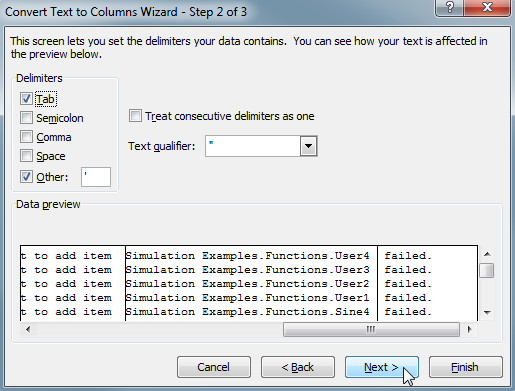
- Click Finish
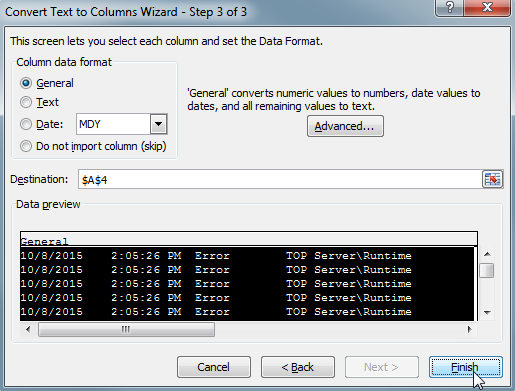
- Select Delimited conversion
- All of the failed item names will now be isolated within Column B