![SWTB_logo_rgb_color_mode-wPadding-2000x961.png]](https://help.softwaretoolbox.com/hs-fs/hubfs/SWTB_General/Images/Press_Kit/SWTB_logo_rgb_color_mode-wPadding-2000x961.png?height=50&name=SWTB_logo_rgb_color_mode-wPadding-2000x961.png)
Yes, the FX5U falls under the Mitsubishi iQ-F Series of PLCs and is supported by the Mitsubishi Ethernet driver in the TOP Server Mitsubishi Suite. Depending on which version of TOP Server you are currently using, there are two methods of communicating with the FX5U:
For TOP Server V6.2 or Newer:
Just select the iQ-F Series from the Model drop-down setting in the Device properties in the Mitsubishi Ethernet driver. Refer to the Mitsubishi Ethernet driver help file appendix "iQ-F Series PLC Setup" for details on setup in the PLC for communications.
For TOP Server V6.1 or Older:
In order to communicate with the FX5U, you will want to use the Mitsubishi Ethernet driver and select the "Q Series" device model. It is important to note the following differences in address mapping:
- FX5U points X0~X7 and X10~X17 map to Q Series Driver as X0~XF.
- FX5U points Y0~Y7 and Y10~Y17 map to Q Series Driver as Y0~YF.
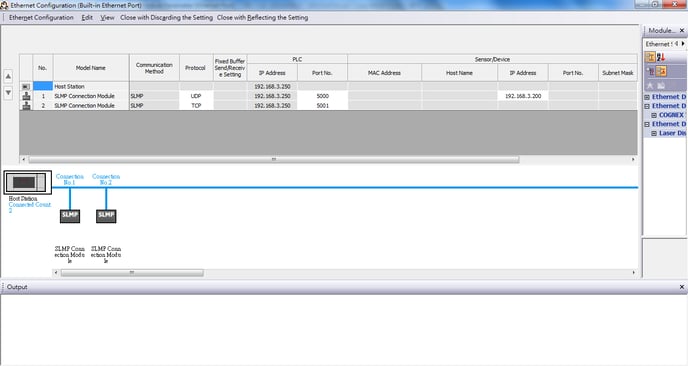
Below is a screenshot from GXWorks that shows the Ethernet/SLMP settings required for the 5U.