![SWTB_logo_rgb_color_mode-wPadding-2000x961.png]](https://help.softwaretoolbox.com/hs-fs/hubfs/SWTB_General/Images/Press_Kit/SWTB_logo_rgb_color_mode-wPadding-2000x961.png?height=50&name=SWTB_logo_rgb_color_mode-wPadding-2000x961.png)
Introduction
A key feature of using OPC UA is the added security that the standard offers. This added security – be it authentication or encryption – is provided through the use of SSL certificates. This document is intended to give an oversight of how to identify situations where a TOP Server OPC UA certificate might need to be regenerated, how to create a new certificate, and how to exchange the new certificates between client and server. This document will also describe the expected OPC UA Connection sequence, as seen in Wireshark, and look at how this can be used to troubleshoot situations where a client is unable to connect to a server.
This document is not intended to be a comprehensive guide to the OPC UA standard, or even the TOP Server OPC UA interface; it will focus on a specific aspect of using TOP Server with OPC UA clients – the certificate exchange.
When to Regenerate a Certificate
There are four situations in which a TOP Server OPC UA certificate should be regenerated:
- After initial installation – Regardless of whether the TOP Server is being installed on a new machine, or is upgrading an existing installation, the first step should be to generate new certificates. This makes sure that the server cannot be using old certificates (perhaps left on the machine from a previous install or testing), and that the latest version of OpenSSL is being used to generate the certificates.
- After an OpenSSL version upgrade – TOP Server uses OpenSSL to generate and authenticate the OPC UA Certificates. As OpenSSL releases new versions (to fix security vulnerabilities like Heartbleed) TOP Server will also install with newer versions of OpenSSL. If TOP server is upgraded and the new version uses a newer version of OpenSSL, the certificates should be regenerated to not fall victim to known security holes.
- After a certificate expires – SSL Certificates are created with a lifespan (typically of 5 or 10 years) after which the certificates should no longer be used to authenticate the client-server connection, and the certificates should be regenerated. Ideally this regeneration would happen prior to the actual expiration date, rather than after.
- After a certificate is compromised – While incredibly secure, the OPC UA Standard is not immune to attacks through social engineering. An OPC UA connection is only secure as long as the private keys that were used to generate the SSL certificate remain private. If this key is shared or lost it can be assumed that all certificates that were generated using this key are no longer secure and should be regenerated.
Regenerating Certificates
TOP Server OPC UA Certificates can be easily exchanged through the OPC UA Configuration Manager. In order to do this:
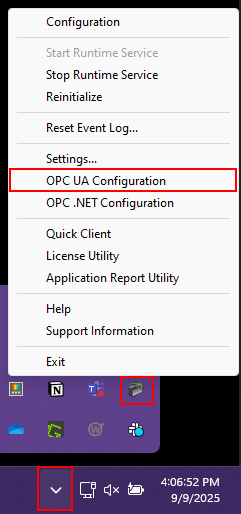
- Right Click on the TOP Server Icon in the system tray and open the OPC UA Configuration option. If there is no TOP Server Icon in the system tray, navigate to Start ⇒ All Programs ⇒ Software Toolbox ⇒ TOP Server V6 and run the TOP Server Administration application.
- Navigate to the Instance Certificates tab to view information on the current certificates that the TOP Server is using, and to generate news ones if deemed necessary.
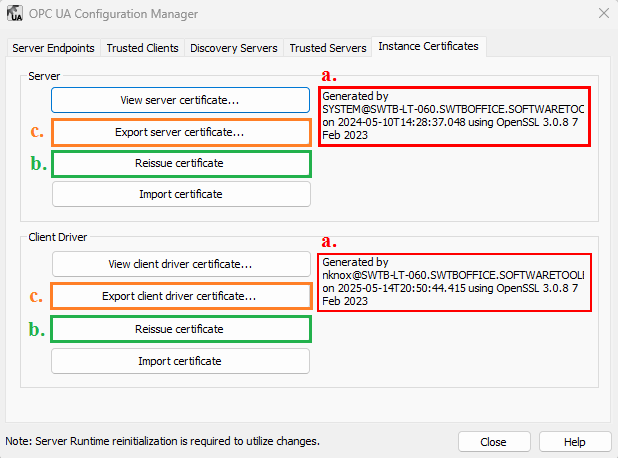
- Verify the information for the current certificate – this information will include who generated the certificate, when it was generated, and the version and release date of OpenSSL that was used to generate the certificate. If the certificate is deemed outdated – based on the guidelines outline above – the certificate should be regenerated.
- To make it easier to track when certificates should be regenerated, it is recommended to reissue both certificates – for the OPC UA Server and the OPC UA Client driver – whenever a certificate is reissued. Using the Reissue certificate button will generate a new SSL Certificate with the current version of OpenSSL, and will update the certificate information in step A.
- This step will vary depending on which feature is used. If an OPC UA Client is making a connection to the TOP Server, then the server certificate should be exported in order to be imported to the client application. If, instead, the TOP Server is acting as the OPC UA Client; then the Client driver certificate should be exported – to be imported in the OPC UA Server.
Exchanging Certificates
Once the TOP Server OPC UA Certificates are reissued and exported. They must be imported into the client application (if TOP Server is acting as the OPC UA Server) or OPC UA Server (if TOP Server is acting as the OPC UA Client) – the steps to do this will vary depending on what the ‘other’ application is, and the appropriate documentation should be referenced on how to do this.
The second half to the certificate exchange is importing the ‘other’ application’s certificate into the TOP Server.
If the TOP Server is acting as the OPC UA Server, navigate to the Trusted Clients tab in the OPC UA Configuration Manager and use the Import Button to import the OPC UA Certificate into the TOP Server trusted clients certificate store. Alternately, if the TOP Server is acting as the OPC UA Client, navigate to the Trusted Servers tab and use the import button to import the OPC UA Certificate.
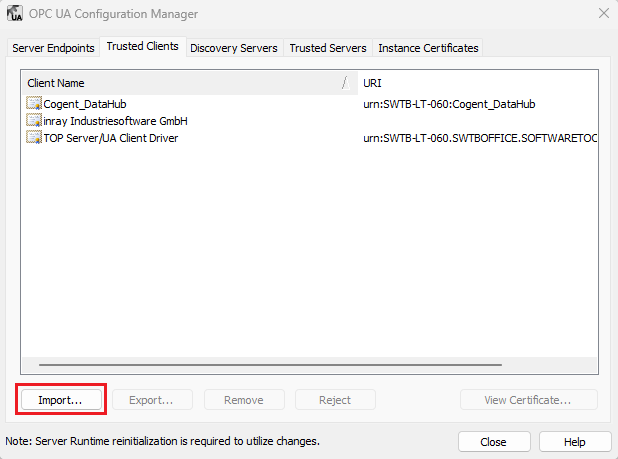
Regardless of whether the TOP Server is acting as the OPC UA Server or client, the OPC UA Configuration manger can now be closed, and the TOP Server Runtime must be reinitialized before the changes will take effect.
Troubleshooting the OPC UA Connection Sequence
When troubleshooting connection issues between OPC UA Server and Client, having a basic understanding of what the connection sequence looks like can help give an idea on the nature of the problem. The steps below describe the connection sequence when working with the TOP Server OPC UA Client driver; they are not guaranteed to apply to every OPC UA Client out there, and look at the connection sequence at a very high level – for detailed information the OPC UA and TLS standards should be referenced. The Wireshark screenshots below also leave out the TCP Frames that are a part of the connection sequence as these are not a focus of this application note, and it is assumed that a TCP connection can be established without issues.
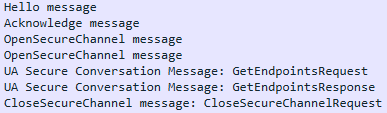
- Hello message and Acknowledge message initialize the negotiations
- OpenSecureChannelRequest – The client application requests to open a secure communication channel. Since the client has no way of knowing what security modes are supported by the server this part is not yet encrypted. This session will be used to determine which security mode to use for communications.
- OpenSecureChannelResponse – The server acknowledges the request to open a secure channel with no security – and the session is opened.
- GetEndpointsRequest – The client requests a list of all endpoints the OPC UA Server is configured for.
- GetEndpointsResponse – The server responds with an array of endpoints, including the security mode that the endpoint supports.
- CloseSecureChannelRequest – The client application closes the connection since it now has a list of the endpoints that the server supports.
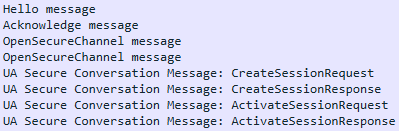
The second session will vary greatly based on the security mode that is used. For a Basic256 Sign and Encrypt the following sequence will be observed:
- Hello message and Acknowledge message initializes the secure session
- OpenSecureChannelRequest – The client application requests to open a secure communication channel. Since the client now knows what endpoints the server has exposed it will specify which supported endpoint to use with the appropriate security mode. The client will now also pass its client certificate to the server.
- OpenSecureChannelResponse – As long as the client certificate matches one of the trusted client certificates, the server will in-turn acknowledge the security mode, and respond with the server certificate.
Note: If the security mode includes encryption the packets will now be encrypted and no longer plain-text - The Client will now create and activate the OPC UA Session to be used for communications.
Conclusion
Using SSL Certificates for client-server authentication and communication encryption makes the OPC UA Standard incredibly secure, but only as long as the certificates are kept current, and exchanged when appropriate. This document gives a quick oversight of manually exchanging OPC UA Certificates when working with the TOP Server, but was not intended to give a comprehensive guide to the OPC UA interface that TOP Server exposes – for a more information on using the TOP Server OPC UA Server, or OPC UA Client Driver please refer to the appropriate documentation and help files.
For further questions on the OPC UA Certificate exchange, our support team is ready to help: