![SWTB_logo_rgb_color_mode-wPadding-2000x961.png]](https://help.softwaretoolbox.com/hs-fs/hubfs/SWTB_General/Images/Press_Kit/SWTB_logo_rgb_color_mode-wPadding-2000x961.png?height=50&name=SWTB_logo_rgb_color_mode-wPadding-2000x961.png)
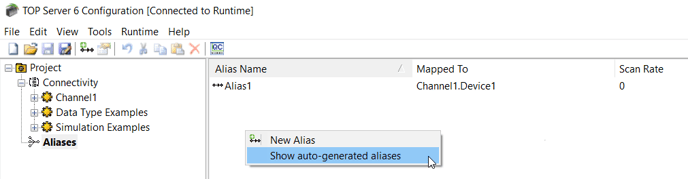
Once you select the Alias Map from your Project tree view, right click in the Alias Map. You will have an option to "Show auto-generated aliases". Once this is selected click off the Aliases tab in your tree view. Once you click back on the Aliases option all of your available aliases will be visible.