![SWTB_logo_rgb_color_mode-wPadding-2000x961.png]](https://help.softwaretoolbox.com/hs-fs/hubfs/SWTB_General/Images/Press_Kit/SWTB_logo_rgb_color_mode-wPadding-2000x961.png?height=50&name=SWTB_logo_rgb_color_mode-wPadding-2000x961.png)
Before OPC connectivity, there was DDE (Dynamic Data Exchange). TOP Server provides DDE connectivity to legacy applications that don’t support more advanced methods of data transfer. If you are not sure what DDE is, see the dictionary of terms at our Technical Expertise Center. The Alias Map of TOP Server lets you create topics for use in your DDE Client applications (click here to learn more about the Alias Map).
NOTE for DDE Client & DDE Client Driver users: TOP Server must run in Interactive Mode and will not run as a Service.
Click for Details
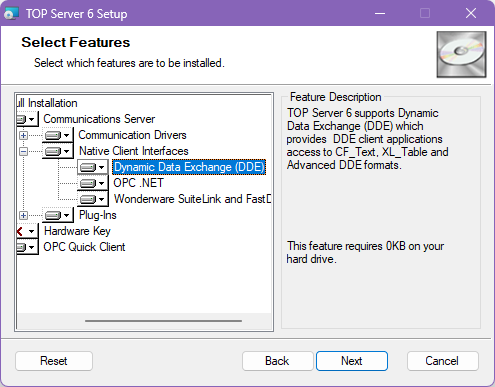
NOTE: For the DDE Client interface and settings to be installed for TOP Server, you must select the “Dynamic Data Exchange (DDE)” option from the Native Client Interfaces during TOP Server installation (see screenshot below).
TOP Server also has the ability, with the DDE Client Driver, to connect to your legacy DDE Servers and provide the information via OPC or any of the other Connectivity options supported by TOP Server. Please see the important note above regarding special requirements for DDE connectivity on certain operating systems.
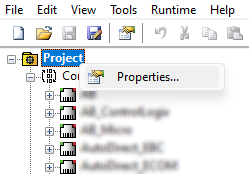
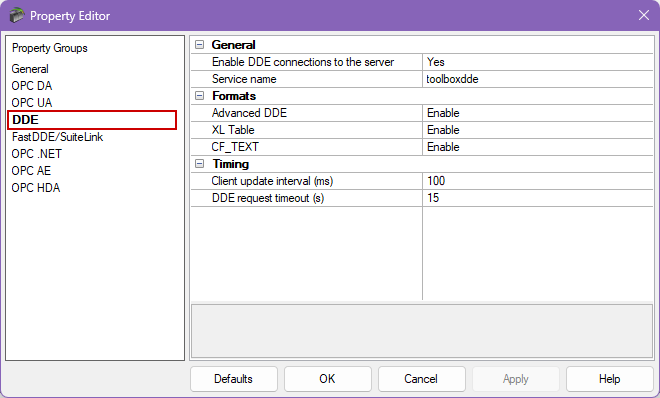
The DDE Settings can be found in the Project Properties as show below. The default DDE Service name is toolboxdde and is not related to running as a System Service.
 |
 |
For more advanced DDE connectivity with Excel, we also recommend Cogent DataHub®.
