![SWTB_logo_rgb_color_mode-wPadding-2000x961.png]](https://help.softwaretoolbox.com/hs-fs/hubfs/SWTB_General/Images/Press_Kit/SWTB_logo_rgb_color_mode-wPadding-2000x961.png?height=50&name=SWTB_logo_rgb_color_mode-wPadding-2000x961.png)
I am making a SuiteLink connection to the TOP Server, and am dynamically addressing tags through the OPC UA Client Driver. My reads seem to be working but my writes are not - how can I fix this?
While there are a number of reasons why writes could be failing, a very common one only concerns TOP Server drivers where addresses do not have a default data type; this includes:
- the ControlLogix Ethernet driver,
- the OPC DA Client driver,
- the OPC UA Client driver,
- and any other driver that uses symbolic addressing - where the address does not indicate what data type will be returned.
With these drivers, TOP Server uses information in the response from the device/remote server to determine what the data type is when performing reads; however, it does not have that same information when performing a write. Particularly, if the write is to a dynamically addressed tag. Commonly, the SMC log will show "Failed to Poke" errors whenever a write is executed.
To resolve this please simply append the @DATATYPE to the end of the item reference in your AVEVA (formerly Wonderware) SuiteLink Client. i.e. "TestTag" would become "TestTag@FLOAT" if the tag is a float - any TOP Server data types are valid here - Word, DWord, Short, Long, Float, Double, etc. For more information on this, please see TOP Server Dynamic Tag Addressing Syntax.
For a list valid data types supported by a specific TOP Server driver, please refer to the Driver Help file. In the Configuration UI, click Help ⇒ Driver Help, and then choose your specific driver. Then look under the topic "Data Types Description". The syntax of the data type suffix MUST be one of those supported by the driver you are using.
If appending @DATATYPE to the end of the item reference is not an option for you, the only other option you have when dealing with a driver that uses symbolic addressing would be to statically define the tags within the TOP Server project namespace and specify the correct data type in the Tag Properties. Here is an example:
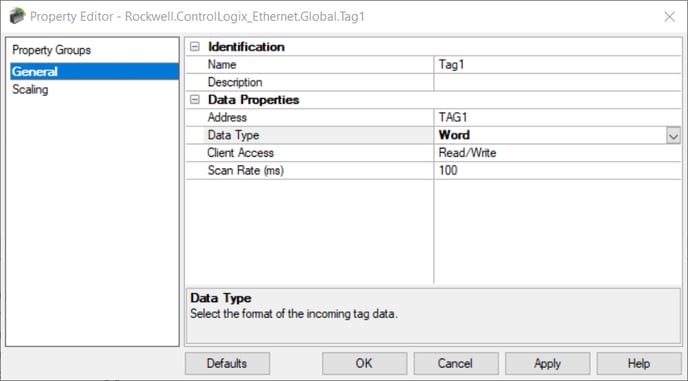
In this case, 'TAG1' is the actual symbolic tag address of this item in a ControlLogix PLC, and we must specify its correct data type as Word in order for the writes to be successful from a SuiteLink Client. Leaving the Data Type field as Default will also result in unsuccessful writes.
After testing different scenarios, below are the results that you should expect when trying to read and write to TOP Server from a SuiteLink Client.
| Tag Addressing Method | Data Type Specified | Read | Write |
| Dynamic | NO | ✔ | |
| Dynamic | YES; @DATATYPE | ✔ | ✔ |
| Static | NO; Default | ✔ | |
| Static | YES | ✔ | ✔ |