![SWTB_logo_rgb_color_mode-wPadding-2000x961.png]](https://help.softwaretoolbox.com/hs-fs/hubfs/SWTB_General/Images/Press_Kit/SWTB_logo_rgb_color_mode-wPadding-2000x961.png?height=50&name=SWTB_logo_rgb_color_mode-wPadding-2000x961.png)
Introduction
Anyone that has spent any time working with automation systems in the Oil and Gas industry will agree that the philosophy driving the design of these systems differs very significantly from those factors driving the design of automation system for other industries; e.g. manufacturing, power, etc.
When managing a system that is potentially distributed over a huge area with hundreds of RTUs sharing a single communication path, there is a shift in focus from gathering data as quickly as possible, to making sure the slow but continuous polling does not overwhelm the communication architecture. This document is intended to be a best practices guide to configuring TOP Server when the goal is to collect not only real-time status data, but Electronic Flow Measurement (EFM) data, as well.
While this document is intended to cater to a specific industry (i.e. Oil & Gas), it will by no means only be useful to the Oil and Gas space; any distributed system architecture will likely require similar considerations and could, therefore, benefit from this content. This document is not intended to be a comprehensive guide to any of the TOP Server features or settings discussed and assumes that the reader has a certain level of familiarity with TOP Server – particularly the nomenclature and components that make up a TOP Server project. The help file should be consulted if any additional information is needed.
System Architecture
With any automation system, it is premature to attempt to set up a communication server without having at least a basic understanding of how the overall system is designed. With a geographically distributed system, it becomes absolutely imperative to have a clear understanding of the system architecture. The goal with a telemetry system should be to minimize the number of devices that are being polled simultaneously, be it for real-time or EFM data, while reducing the impact communication issues with a single device or site would have on the server update rate as a whole.
System aspects to consider:
- The total number of sites we will be communicating with
- The number of devices at each site
- The number of unique communication paths to each site. These could be radios, satellite, or hardwired connections to each site, and would be paths that are shared by all devices at the site
- How many simultaneous requests or connections each communication path supports. (i.e. determine how many devices can be polled at once without overwhelming the routing architecture, or risk collisions which would cause problems for the entire system.)
When looking at the system below the following data can be derived:
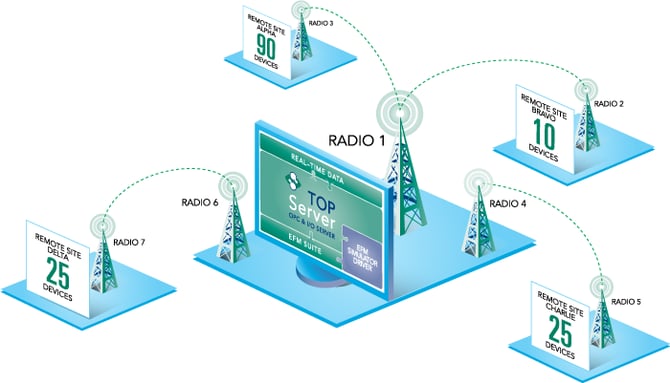
- 4 Sites – Alpha, Bravo, Charlie, and Delta
- 150 devices total; 90 at Alpha Site, 10 at Bravo Site, 25 at Charlie Site, and 25 at Delta Site
- There are 4 communication paths, one to each of the sites, but Radio 1 serves as the local radio to communicate to both Alpha and Bravo sites which will need to be considered when designing the TOP Server project as we do not want Radio 1 to be overwhelmed.
- While each radio might support multiple simultaneous connections we will assume that each radio only supports a single request at a time.
Channel and Device Configuration
It may be counter-intuitive, but the basic architecture for a telemetry systems does not differ very much from any other TOP Server project and the one device per channel rule should be observed, whenever possible. With an Ethernet-based system, the one device per channel rule allows for simultaneous communications to all devices, since the Channel represents the local socket or com port that gets opened for communications and each channel operates independently from the other channels in the project. With a telemetry system, the goal is to prevent multiple requests from going out at the same time - so why, then, the preference for a single device per channel?
- It provides for the most granular (and, therefore, useful) extended diagnostics, since channel diagnostics now only pertain to a single device. This is particularly true for the pending reads and pending writes statistic tags which exist at the channel level, and can now give insight into the number of pending transactions that are queued up for a device.
- It allows for easily adding new devices to the project without requiring significant redesign of the existing architecture, and adding new routing/communication paths could be as easy as moving a device from one virtual network to another. (More on virtual networks below)
- It allows for system changes to be done more easily. If the telemetry system is ever replaced by a hardwired network connection – where bandwidth and timing are no longer a concern – the project can be modified in a matter of minutes to allow for simultaneous communications.
Virtual Networks
When multiple devices are configured under a single TOP Server channel, communication tasks for these devices are processed sequentially – one at a time in the order that they are listed in the TOP Server project (sometimes referred to as “round-robin”).
However, consider the scenario where a remote site is not entirely made up of the same device type, or at least devices that use the same communication protocol. Since the communication protocol is set at the channel level, it would be impossible to configure a TotalFlow RTU under a Fisher ROC channel. With a telemetry system where every device is configured under its own channel a virtual network will handle that serialization.
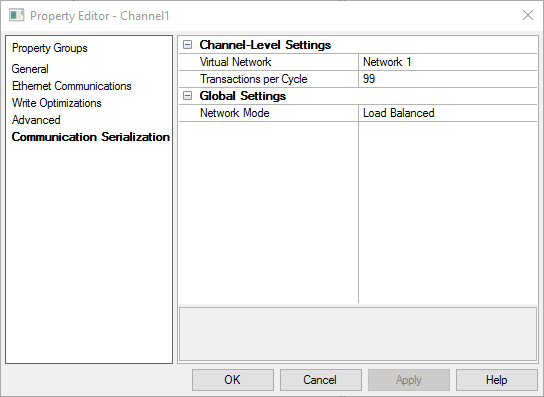
A virtual network will serialize any and all communications for channels that are configured for the network (i.e. any devices that share a common virtual network will be ‘processed’ one at a time, with each channel having been allotted a certain number of transactions when it becomes that channels ‘turn’ to communicate).
The Transactions per Cycle setting should be set high enough to allow all data for a device to be polled in a single scan cycle; determining the ideal transactions per cycle count might seem difficult, but is actually relatively easy.
Since the Pending Reads and Pending Writes tags now indicate the total number of Transactions pending for a device (because there is only a single device per channel), at any given time these tags can be used to provide a good estimate for the required transactions per cycle. Seeing that there are always 5 pending reads and 2 pending writes indicates that at least 7 Transactions are needed per scan cycle – add a little bit of buffer and 10 transactions per cycle would be appropriate.
The TOP Server allows for up to 500 Virtual Networks, and there should be a single virtual Network per unique communication path identified in the architecture. For example, in the system above, since the design decision was made that these radios would only support a single request at a time, the TOP Server project would be configured with a virtual network for the 25 Channels at Delta site, a second virtual network for the 25 Channels at Charlie site, and a third virtual network for the 100 Channels going to Alpha site and Bravo site.
Alpha and Bravo site are combined into a single virtual network because they share Radio 1, and while Radios 2 and 3 can each process a single response, Radio 1 can only communicate with one of the two at a time.
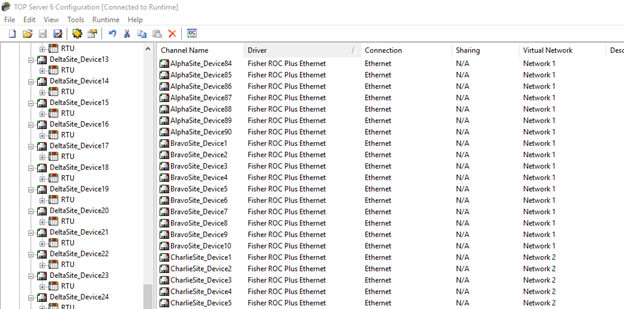
The use of Virtual Networks will also expose a number of additional system tags that give great insight into how many times a device has had a “turn” to communicate, and how long it is taking a device to communicate on average.
Scheduling Data Polling
The Scheduler plug-in allows the TOP Server to poll devices without the need for a client to be connected and for clients to be updated from cache based on the last value polled. This gives the server complete control of when the devices will be polled instead of the polling interval being driven by the requested client scan rate.
This functionality can be particularly useful when a large amount of data is polled at once, but the client updates are infrequent – the TOP Server will poll the devices at the specified rate, and whenever a client connects it will receive the last cached value. This cached value is guaranteed never to be older than the scan interval specified in the schedule – unless the value is not changing every scan cycle.
When configuring the scheduler plug-in, it is imperative to keep in mind the rate at which the data from a site is needed. Ideally, a single schedule will be configured per site if all data from a site can be read at once, or one schedule can be configured for each unique update rate per site.
In our example earlier, if all information from Alpha Site is needed at 15 minute intervals with the exception of a few devices which can be polled ever hour – two schedules should be configured. Adding devices to a schedule will change their scan modes to Demand Poll Only and the schedule will manually trigger a demand poll at the schedule’s configured scan rate, since all devices are configured under the same Virtual Network the polling to each site will forced to be sequential. Since the device is not disabled altogether, a client can still force a manual read outside of the scheduled interval by writing to the _DemandPoll system tag; this will not affect the timing of the next scheduled task.
Through the use of schedule exceptions, a schedule can be set to only be followed during certain times. This can be particularly powerful when a device’s scan rate is dependent on the time of day (maybe the polling should be done more frequently during times where production will be greater), or where the scan rate should be disabled all together (situations where radios might be solar powered and data should not be polled overnight).
EFM Data Collection
The EFM Exporter plug-in is configured similarly to the scheduler plug-in, in that a single EFM Polling group should be configured per dataset. Unless varying update rates are needed, a single EFM poll group should be created for each flow computer, and all meters for a flow computer should be added to the corresponding poll group. There is no reason to worry about EFM and real-time polls overlapping or interfering with one-another, as the TOP Server automatically takes care of that behind the scenes. In situations where an EFM poll coincides with real time data reads, the two are interleaved with one EFM poll per three real-time data reads. Since the timing of the EFM polls can be set, if the reduced update rate is a problem, the EFM polls should be offset to avoid overlap any real time data polls.
Conclusion
This document is intended to give a brief oversight of the best practices when it comes to TOP Server project design in telemetry systems – particularly those in the Oil and Gas industry. These rules are unfortunately not cut-and-dry and ideal configurations might vary slightly from system to system. Based on the content above, the best practices for TOP Server project design can be reduced to a simple checklist:
✅ One device per channel rule is being followed
✅ One virtual network per unique routing path to each site
✅ One EFM Poll Group per Flow Computer with all meters for that flow computer configured under the same poll group
✅ One Schedule per update rate per site
- OR -
✅ One Schedule per site, if all data at a site is needed at the same rate
For further information on any features or plug-ins that were mentioned in this document please reference the TOP Server help file, and/or contact our support team at: