![SWTB_logo_rgb_color_mode-wPadding-2000x961.png]](https://help.softwaretoolbox.com/hs-fs/hubfs/SWTB_General/Images/Press_Kit/SWTB_logo_rgb_color_mode-wPadding-2000x961.png?height=50&name=SWTB_logo_rgb_color_mode-wPadding-2000x961.png)
There is a known issue with the Microsoft KB405689x Meltdown/Spectre patches when a COM application (like an OPC DA Client or server) calls CoInitializeSecurity and sets the impersonation or authentication levels to 'none'.
This does not solely impact the TOP Server or Quick Client, but ANY application that uses COM Objects when calling CoInitializeSecurity.
Microsoft has released an additional patch (the KB number varies by Operating System and build) to fix this issue., and we recommend working with your IT Group to make sure that the latest Windows patches are applied and that this CoInitializeSecurity issue is patched. To find the patch from Microsoft what we have found it to be easiest is to find the original January 3, 2018 patch for your OS, and they will have a check the list of "Known issues in this update" like the example shown below for KB4056898 for Windows Server 2012R2 that shows this specific issue:
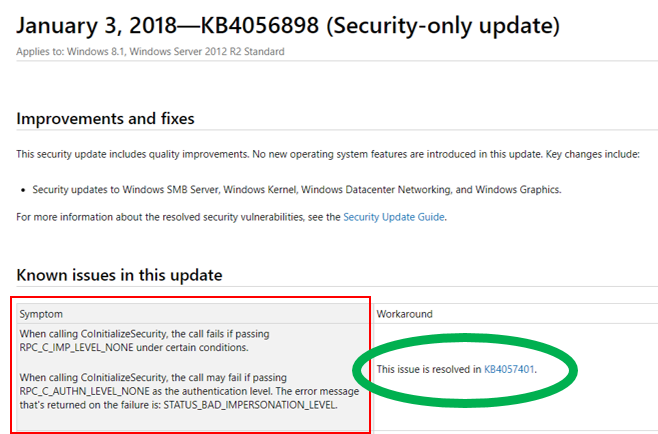
Notice how they show in the workaround that the issue has been patched by KB4057401 . Of course when you get to KB4057401, you'll need to check its known issues. Unfortunately the patches to the KB405689x patches aren't following an easy syntax so use the strategy above to help your research.
Above all we strongly recommend working with your company's IT group to make sure the latest Windows patches are applied and that this CoInitializeSecurity issue is patched in accordance with your company standards, practices, and policies.
Alternately, if patching the Microsoft patch isn't feasible, a temporary work around can be to - in the Quick Client - navigate to Tools ⇒ Options and make sure that the "Use DCOM for remote security" checkbox is checked, even if this is a local connection. The Quick Client will need to be restarted in order for the change to take effect.