![SWTB_logo_rgb_color_mode-wPadding-2000x961.png]](https://help.softwaretoolbox.com/hs-fs/hubfs/SWTB_General/Images/Press_Kit/SWTB_logo_rgb_color_mode-wPadding-2000x961.png?height=50&name=SWTB_logo_rgb_color_mode-wPadding-2000x961.png)
After launching the LGH File Inspector an error is thrown that the current machine timezone cannot be found. How is this error resolved?
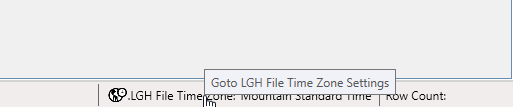
When the LGH File Inspector launches, it attempts to automatically determine the time zone of the LGH Files to which it is pointed and the machine on which it is running. If it is unable to resolve the time zone successfully, the referenced error is thrown. Simply acknowledge the error, open the LGH File Inspector Time Zone Settings by pressing the button in the lower right corner of the task bar, and manually set the appropriate time zone for the machine.