![SWTB_logo_rgb_color_mode-wPadding-2000x961.png]](https://help.softwaretoolbox.com/hs-fs/hubfs/SWTB_General/Images/Press_Kit/SWTB_logo_rgb_color_mode-wPadding-2000x961.png?height=50&name=SWTB_logo_rgb_color_mode-wPadding-2000x961.png)
Starting with TOP Server V6.8, in order to force TOP Server to only collect a specific amount of EFM history from an ABB Totalflow meter on the next EFM poll, you will need to write the desired number of archives to retrieve to the the following 3 rollback tags in the ABB Total Flow meter in the EFM Exporter group (see the highlighted tags in the screenshot below):
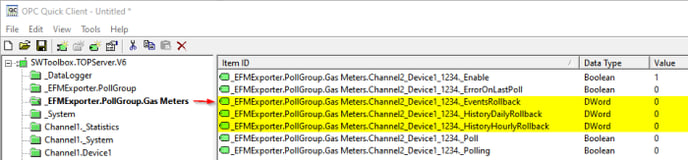
If you a value to these tags of X (where X is the number of records to go and retrieve for each archive type) before the initial poll, the driver will only retrieve and backfill those specific records (as opposed to retrieving the full archive). A value of 0 (default) means the driver will retrieve the full archive, a value of 1 means the driver will retrieve a single records, a value of 100 means the driver will retrieve the last 100 records, etc.
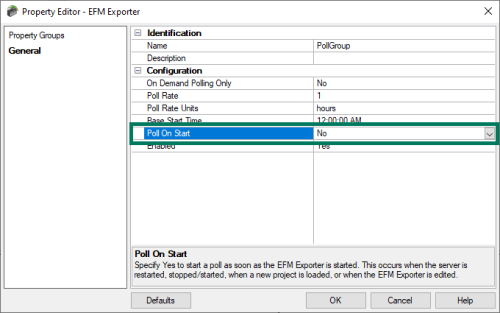
You will need to make sure the setting "Poll On Start" in the EFM Poll Group is set to "No" to prevent an initial startup poll from retrieving the entire archive before you can set these values.