![SWTB_logo_rgb_color_mode-wPadding-2000x961.png]](https://help.softwaretoolbox.com/hs-fs/hubfs/SWTB_General/Images/Press_Kit/SWTB_logo_rgb_color_mode-wPadding-2000x961.png?height=50&name=SWTB_logo_rgb_color_mode-wPadding-2000x961.png)
Yes, it is possible for the OPC Router to run an application. This can be done through the scripting. This answer will show you the script needed and attach an example configuration you can import. This specific example executes a Python application.
Importing the Example
- Download RunPythonExample.rpe
- Open OPC Router and go to File -> Import Project.
- Select the file form step 1 and click Open.
- On the left hand side you should see the import will include a script called RunProcess, a variable named Dummy, and a connection named RunPython.
- Click Ok to complete the import.
How the Script Works
To see how this script works, let's look at the image of the connection below. The script takes two Inputs; ProcessFileName and ProcessArguments. For this example we need both. Some applications can be run without arguments.
The Output of the script is an ExitCode that indicates success or failure.
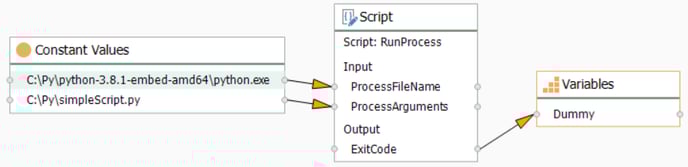
Below is a copy of the code from the script.
public override void Write()
{
    if(!string.IsNullOrEmpty(ProcessFileName))
    {
        ProcessStartInfo processInfo = new ProcessStartInfo();
        processInfo.FileName = ProcessFileName;

        if(!string.IsNullOrEmpty(ProcessArguments))
        {
            processInfo.Arguments = ProcessArguments;
        }
        processInfo.UseShellExecute = false;
        processInfo.CreateNoWindow = true;
        System.Diagnostics.Process p = Process.Start(processInfo);
        p.WaitForExit();
        ExitCode = p.ExitCode;
        p.Dispose();
    }
}