![SWTB_logo_rgb_color_mode-wPadding-2000x961.png]](https://help.softwaretoolbox.com/hs-fs/hubfs/SWTB_General/Images/Press_Kit/SWTB_logo_rgb_color_mode-wPadding-2000x961.png?height=50&name=SWTB_logo_rgb_color_mode-wPadding-2000x961.png)
We list systems that we have tested on our website, but it is impossible to test every IMM on the market. Success with others will depend on your technical ability based on reading this FAQ, the manufacturer's quality of EUROMAP 63 implementation, and the documentation they provide. We are not able to provide you with a step-by-step configuration guide for every IMM on the market. No driver supplier can practically do that. The number of IMMs we can connect in a single driver is also application dependent and is discussed later in this FAQ.
Unlike typical communications protocols like Modbus etc, EUROMAP does not define the protocol for communicating "over the wire" as we say - by that we mean over some serial RS232/422/485 or Ethernet connection. This means it has some details that users of typical drivers may find confusing. Our goal here is to provide an overview for technical readers, of what they must consider.
EUROMAP 63 is a file based protocol. The standard defines the format of the data within the files that are transferred between the Injection Molding Machine (IMM) and the computer & software that wants to communicate with it. The list of parameters available in the file is further defined by the machine manufacturer and they must provide that information to the owner of the IMM. Sometimes the IMM manufacturer natively supports EUROMAP 63, sometimes they require the user to obtain additional software from them in order for the IMM to support EUROMAP 63.
On the left side is the example of the IMM vendor requiring additional software, that talks to their machine but generates EUROMAP 63 files.
On the right side is an example of the IMM vendor having it's own means of transferring the files to the computer where TOP Server is running, possibly via FTP.
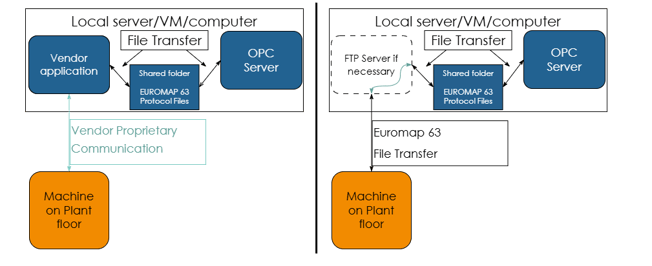
If FTP is required, the user supplies the FTP server software, either by enabling the feature in Windows Server or obtaining a 3rd party FTP server software application.
The files are exchanged between the IMM and the computer, and the resulting driver (i.e. TOP Server EUROMAP 63 driver) through 3 options listed below. The driver watches for new files, then processes them including discarding processed files to avoid filling up disks.
1) A local file path - in this case the TOP Server would have to be running on the same computer as any software from the IMM manufacturer that creates the files for data exchange
2) By way of a Windows file share over a network
3) FTP file transfer to a folder that TOP Server can access as a local file or a Windows file share.
The TOP Server EUROMAP 63 driver expects that
- You will be able to use one the methods mentioned to get the files onto a folder TOP server can access locally or via Windows file share. You specify the folder location when you configure the driver
- The text files provided are well formed and follow the EUROMAP 63 standard
- You can obtain from the IMM manufacturer the list of parameter names that are coming across from the device.
We suggest you research for your IMM make and model to determine:
- How they transfer the files to see if you need added software from the IMM manufacturer also or not, and if you can see how they would get the files to a file path TOP Server can access.
- What documentation they provide around the parameter sets available from their machine.
- Consider downloading a free trial of the TOP Server EUROMAP 63 driver from it's webpage and testing.
As for the # of IMMs per TOP Server EUROMAP 63 driver instance:
The driver technically allows for up to 1024 channels with up to 16 devices per channel which results in 1000's of machines possible. It is unlikely you would ever configure that many devices, as you will run into operating system available resources limits before that. Ultimately performance is a function of the method of file transfer, amount of data moved, speed of updates, network speed, etc.
Once you have researched as suggested, or after reading this, if you have further questions, you can submit a support ticket for further assistance.