![SWTB_logo_rgb_color_mode-wPadding-2000x961.png]](https://help.softwaretoolbox.com/hs-fs/hubfs/SWTB_General/Images/Press_Kit/SWTB_logo_rgb_color_mode-wPadding-2000x961.png?height=50&name=SWTB_logo_rgb_color_mode-wPadding-2000x961.png)
This issue typically occurs due to the following possible reasons:
- Limited resources available 32-bit application
- Memory usage high
- Excessive Client count
- Excessive Client tag requests
- Wrong communication port setting [port]
- TOP Server Service stuck in “Stopping or Stopped”
How to Solve Reason #1:
- Check available resources Windows Task Manager

- Memory usage
- High project tag count
- Excessive Client count
- Excessive Active Tag count
- (Check Clients connected and Active tags lower right-hand corner of configuration utility screen)

- (Check Clients connected and Active tags lower right-hand corner of configuration utility screen)
How to solve Reason #2:
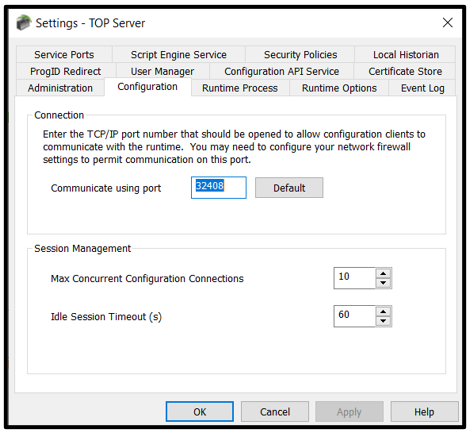
- Verify port number configured for configuration client
- Go to TOP Server Administration > Settings... > Configuration tab
- Set Communication using port = 32408 (default)
How to solve Reason #3:
- Open system Services app
- Find TOP Server [version] Runtime
- TOP Server Runtime service requires a status of “Running”
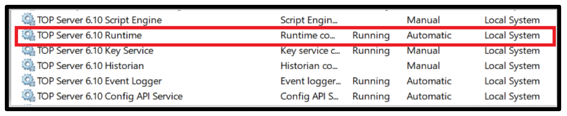
- If stuck in Stopping, proceed with force stopping the service:
- Open Command Prompt to find PID
- Type:
sc queryex TOPServerV[#] - Take note of PID #
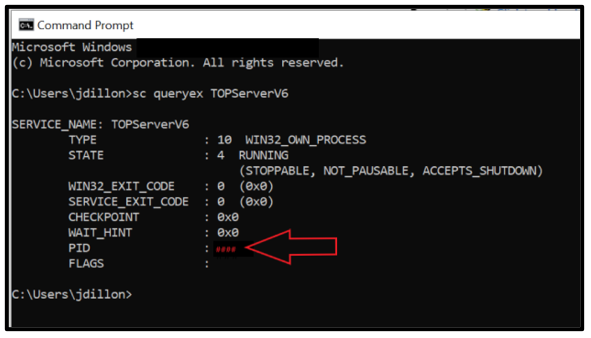
- Next force kill the service by PID in Command Prompt
- Enter command:
taskkill /f /pid [PID X] (example: taskkill /f /pid 999) - Return to Windows Services and restart TOP Server Service
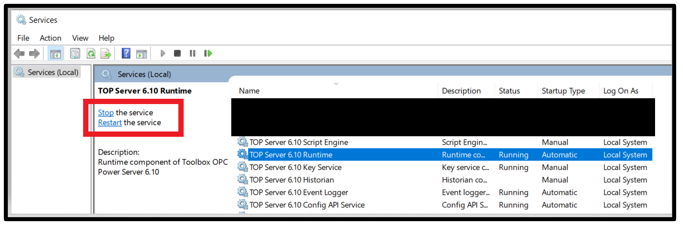
- Open TOP Server Configuration Application
- Check for successful connection
