![SWTB_logo_rgb_color_mode-wPadding-2000x961.png]](https://help.softwaretoolbox.com/hs-fs/hubfs/SWTB_General/Images/Press_Kit/SWTB_logo_rgb_color_mode-wPadding-2000x961.png?height=50&name=SWTB_logo_rgb_color_mode-wPadding-2000x961.png)
Why is my SuiteLink Client not automatically reconnecting to my TOP Server after a machine reboot? I am having to Reinitialize my TOP Server manually to establish communications.
When a machine goes offline, or is rebooted, the SuiteLink Server (TOP Server) may become unregistered with the SuiteLink Service. When the machine is back up and running, the TOP Server requires re-initializing to force the registration with the SuiteLink Service again and re-establish communications with Wonderware/AVEVA.
To prevent this issue, and automatically reconnect via the SuiteLink Service, follow these steps:
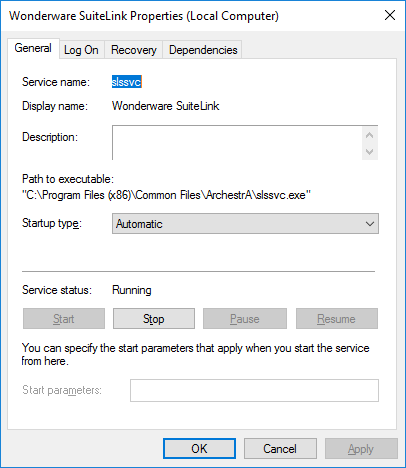
- Wonderware SuiteLink Service (slssvc) should be set to have a Startup Type of "Automatic" in the Properties window:
-
Run a Command Prompt as administrator and execute the following command:
sc config TOPServerV6 depend= slssvc/DcomLaunch/RpcEptMapper/TOPServerLoggerV6/TOPServerKeySvcV6/TapiSrv -
Please restart the machine to apply these changes. Verify the Dependencies under the TOP Server Runtime properties.
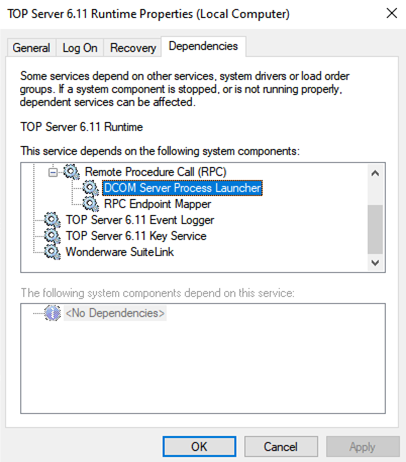
Executing this command will make the TOP Server Runtime Service dependent on the Wonderware SuiteLink Service. This forces the TOP Server to start only after the SuiteLink Service has already started, allowing the server to register properly upon startup.
Uninstalling, Upgrading, or Repairing the TOP Server application will remove the added dependencies and reset the service dependencies back to default. After an upgrade or reinstall you will need to run the command once again.
If you are experiencing issues troubleshooting your SuiteLink communications, check out our blog here: https://blog.softwaretoolbox.com/troubleshooting-suitelink-connections