![SWTB_logo_rgb_color_mode-wPadding-2000x961.png]](https://help.softwaretoolbox.com/hs-fs/hubfs/SWTB_General/Images/Press_Kit/SWTB_logo_rgb_color_mode-wPadding-2000x961.png?height=50&name=SWTB_logo_rgb_color_mode-wPadding-2000x961.png)
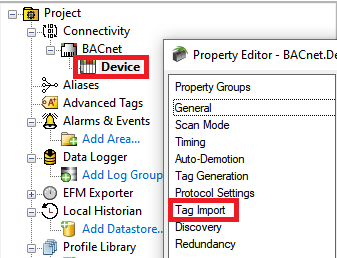
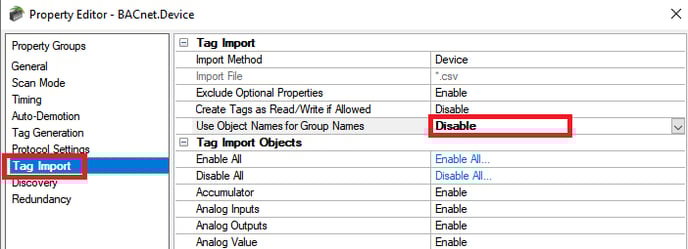
When enabled, new tag groups are given the name of the corresponding BACnet object name. If the object name is not defined or is not unique, the driver assigns a default name to the group, which would essentially have the same results as if this property were disabled.
|
Tag Group Name |
Description |
Example |
|
|
Enabled |
ObjectName |
BACNet Object Name is used for Tag Group Name. The Object Name is the descriptive name given in the device. |
N/A; because this uses the descriptive Object Name from the BACnet device, this name could be anything |
|
Disabled |
ObjectType_InstanceNumber |
BACNet Object Type and Instance Number are used as Tag Group Name. |
MultistateValue_1, where MultistateValue is the ObjectType and 1 is the Instance Number |
Users may want to disable this setting to display groups in a similar way to how event log calls out tag address errors in the event log. Errors in the event log are displayed in the following Tag Address format: ObjectType.InstanceNumber.TagName
Following along with the Example above, the Tag Address in the Event Log may appear as MultistateValue.1.EventState, so having the Tag Group Name be MultistateValue_1 will make it easier to associate the Event Log errors with the correct Tag Group.