![SWTB_logo_rgb_color_mode-wPadding-2000x961.png]](https://help.softwaretoolbox.com/hs-fs/hubfs/SWTB_General/Images/Press_Kit/SWTB_logo_rgb_color_mode-wPadding-2000x961.png?height=50&name=SWTB_logo_rgb_color_mode-wPadding-2000x961.png)
TOP Server supports dynamic address references for all of its client interfaces. For OPC UA clients, the syntax is quite a bit different than for other client interfaces. While the below steps reference the Unified Automation UAExpert test client, the same syntax and basic steps would apply to any OPC UA client needing to access TOP Server tags dynamically.
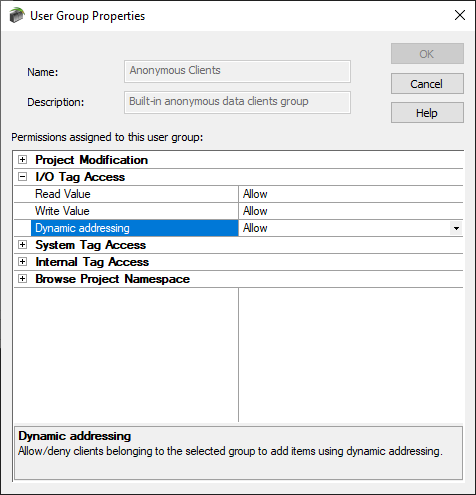
First, it's important to know that to use dynamic addressing from client application with TOP Server, dynamic addressing must first be enabled. While this is typically enabled during the installation process, if you accidentally disabled dynamic addressing, it can be enabled at any time by accessing the User Manager settings:
- Right-click on the system tray TOP Server Admin > Setting > User Manager.
- Edit the properties of the "Anonymous Clients" group, expand "I/O Tag Access" and set "Dynamic addressing" to "Allow" and Apply.
- Now, with the UAExpert OPC UA client connected to TOP Server (for details on setting up OPC UA client connections to TOP Server, click here for our quick start), in the Data Access View, you will right-click in the main part of the view window in the center and select “Add custom node”.
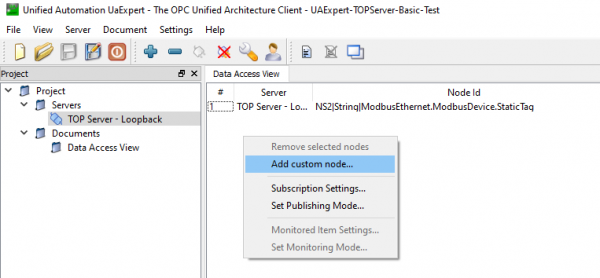
- Then, you select a Node ID of 2 and a type of “String”.
- Then, in the field as shown below, you have to enter the Channel.Device.Address@datatype (otherwise, if you don’t specify the data type, the default for the address will be used as is documented in the TOP Server driver-specific help file for the driver you're using).
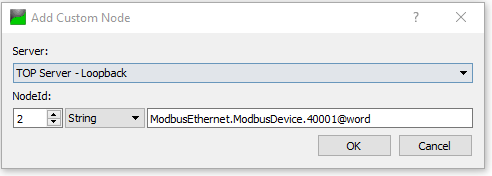
- This results in a Node ID field that looks like the following – NS2|String|Channel.Device.Address@datatype as shown below:


- The NS2|String| part is all taken care of by specifying that Node ID and the type of String.
- The method required by other OPC UA clients will likely be different but the specific syntax should remain the same for any OPC UA client application.