![SWTB_logo_rgb_color_mode-wPadding-2000x961.png]](https://help.softwaretoolbox.com/hs-fs/hubfs/SWTB_General/Images/Press_Kit/SWTB_logo_rgb_color_mode-wPadding-2000x961.png?height=50&name=SWTB_logo_rgb_color_mode-wPadding-2000x961.png)
This FAQ discusses how the OPC Router product is affected by the changes made by Windows updates that are described in Microsoft's KB5004442 advisory regarding Windows Updates that have been rolled out to affected operating systems by Microsoft since June 8, 2021 to address vulnerabilities in DCOM described in CVE-2021-26414. Due to upcoming enforcement actions by Microsoft, users may need to take actions described in this FAQ. This FAQ is a supplement to our overall detailed technical FAQ regarding DCOM Hardening which contains information that is common to all products affected by DCOM hardening. You may also request our free detailed Remote OPC DA Classic (DCOM) Configuration Guide here with recommendations for DCOM setting configuration on OPC DA client and server machines where connections will be remote (client and server on separate machines).
Contents
- 1 Am I Affected?
- 2 Product-Specific Information
- 3 Product-Specific Recommendations
- 4 What about OPC DA Clients from other Vendors?
- 5 Alternative Solutions to using DCOM
- 6 Disclaimer
- Connections to OPC DA servers running on different computer or virtual from OPC Router, which means DCOM is being used.
- Connections to OPC DA Servers located on the same computer or virtual as OPC Router
- OPC UA client connections from OPC Router
- OPC UA server interfaces exposed by OPC Router
General Relevant Product Information
Is OPC UA available in this product as an alternative? Yes, OPC Router is also an OPC UA client and that functionality is included with your OPC DA client license.
Product Specific Settings Recommendations
Remember that if you make any changes to DCOM settings in Component Services, you MUST restart the OPC Router runtime for the product to know about the changes. If they make changes on the OPC Server side, the OPC server must also be restarted. This is the nature of DCOM settings because applications using DCOM can only get their security settings one time at startup.
What About Other Vendors' OPC Classic Servers Being Used with OPC Router?
As covered in our DCOM Hardening FAQ, all OPC Classic client and server applications have two methods that may have been implemented with respect to handling DCOM Authentication Level. They can:
-
Set DCOM security settings programmatically, or
-
Allow their application to use settings in the Windows Component Services DCOM Config utility to determine the settings
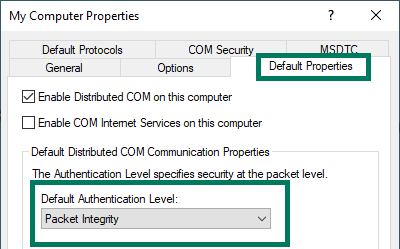
OPC Router uses method #2, so as long as you have configured the default DCOM Authentication Level to use Packet Integrity as covered in our DCOM Hardening FAQ, OPC Router OPC DA client connections should continue to work.
For your OPC DA Classic server applications being used with OPC Router, you will need to consult with that server application vendor to confirm which method they are using for DCOM security settings.
For OPC DA Classic Server Vendors Using Method #1, that vendor will either have to provide a version of their software that allows the DCOM Authentication Level to be configured in the software or a version where the hard-coded DCOM Authentication Level is Packet Integrity level.
For OPC Classic Server Vendors Using Method #2 like OPC Router, making the previously indicated adjusted of computer's global DCOM Authentication Level to Packet Integrity should be all that is required (this change needs to be performed on both the OPC Classic client and server machines).
If you're unsure which method your other OPC DA Classic server software vendors are using, ask them how they are addressing Microsoft's DCOM hardening changes as they apply to their OPC Classic solutions.
Considerations Regarding Alternatives to DCOM
DCOM has been a challenge for users making remote OPC Classic connections for many years, due to the subtle nuances of DCOM operation between different Windows operating systems and different network architectures. As such, there are several alternatives available for users that prefer to migrate away from DCOM entirely ahead of these DCOM hardening changes as a method for future-proofing remote connections from any further Microsoft changes to DCOM security.
- Simply migrate all OPC Classic client and server applications to reside on the same computer (resulting in local only OPC Classic connections that are not susceptible to DCOM security changes).
- Migrate from OPC Classic to OPC UA wherever possible for remote connections. OPC Router, for example, is also an OPC UA client and server. One of the key benefits of OPC UA is increased security without the pitfalls of DCOM for remote connections. To learn more about OPC UA, click here.
- If you are unable to enable OPC UA on your OPC DA Server application so it could since OPC Router is an OPC UA client, you could put the DataHub OPC Gateway on your server machine, so that OPC Router is talking to the gateway as an OPC UA server, and then the gateway communicates via OPC DA locally to the server on the same machine. Contact us for details.
- You could also use OPC Tunneling with the OPC Router using DataHub; however because OPC Router is already an OPC UA client and server use of the OPC Gateway to convert your OPC DA server to UA will be more cost effective in most cases. Contact us to discuss if you have any confusion or need help.