![SWTB_logo_rgb_color_mode-wPadding-2000x961.png]](https://help.softwaretoolbox.com/hs-fs/hubfs/SWTB_General/Images/Press_Kit/SWTB_logo_rgb_color_mode-wPadding-2000x961.png?height=50&name=SWTB_logo_rgb_color_mode-wPadding-2000x961.png)
OmniServer, Server and Professional Editions, can support 2048 devices, topics, and clients in total.
With that being said, by default, the Maximum Number of UA Client sessions is 100.
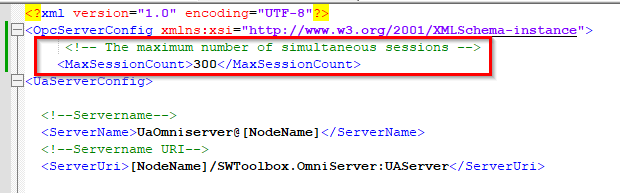
To increase this you will need to edit OmniServer's Server Configuration XML File. You can find this file located at the below file path:
C:\ProgramData\Software Toolbox\OmniServer\OmniServerUAConfig.xml
Once open, you will need to append the OPCServerConfig section to the following:
<MaxSessionCount>#</MaxSessionCount> Where "#" is the number of required sessions. Setting this number to "0" will give you unlimited amount of UASessions (although you are limited by the resources available on the computer with respect to performance).Configuration Change Example: