![SWTB_logo_rgb_color_mode-wPadding-2000x961.png]](https://help.softwaretoolbox.com/hs-fs/hubfs/SWTB_General/Images/Press_Kit/SWTB_logo_rgb_color_mode-wPadding-2000x961.png?height=50&name=SWTB_logo_rgb_color_mode-wPadding-2000x961.png)
The TOP Server Siemens S7 Plus Ethernet Driver includes a configurable setting for loading Function Block and Instance Data Block (InstanceDB) symbols.
This is disabled by default to limit the tag quantity returned by the device during an Online Automatic Tag Generation; however, it is important to be aware of this setting in case those Data Blocks and Function Blocks are required. Go to Communications -> Symbol Load in the Device Properties and set 'Include Instance Data Blocks and Function Blocks' to Enable. Performing another ATG will load the missing items from the Device.
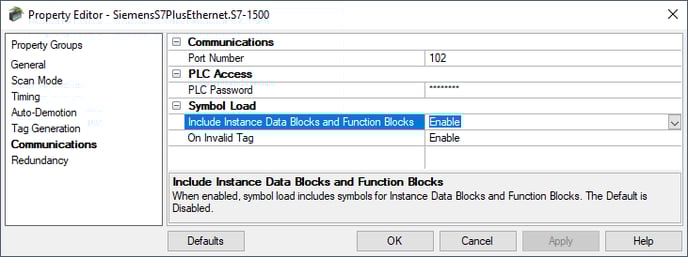
This property is not exposed as a step in the Device Wizard, so the chances of missing it are high. It is only available with the other settings in the Communications Property Group at the very end of the Device Wizard, or through the Device Properties after the Device has been added to your Channel. This has been logged as an enhancement request to include it in the Device Wizard.