![SWTB_logo_rgb_color_mode-wPadding-2000x961.png]](https://help.softwaretoolbox.com/hs-fs/hubfs/SWTB_General/Images/Press_Kit/SWTB_logo_rgb_color_mode-wPadding-2000x961.png?height=50&name=SWTB_logo_rgb_color_mode-wPadding-2000x961.png)
OpenSSL is an open source library used by many OPC UA applications to secure communications. OmniServer uses OpenSSL to secure communications with its OPC UA Server interface.
OmniServer V3.3.0.3 (Released Sept 14, 2023) included an upgrade to OpenSSL 3.0.10. This was due to the OpenSSL 1.1.1 End of Life announcement. The 1.1.1 series will no longer receive publicly available security fixes.
OmniServer is often used in systems where safety and uptime are key components, and because cybersecurity threats are increasing in both frequency and complexity, Software Toolbox always prioritizes security in its products. Since the upgrade to OpenSSL 3.0.10, our team has discovered an unintended side effect in OmniServer, which may ultimately be in our users' best interest.
For secure OPC UA connections, all OPC UA applications utilize a certificate. With OpenSSL 3.0.10, OmniServer generates a certificate that uses the SHA-256 hash algorithm. Extensive testing has shown that if the OPC UA Client application connecting to OmniServer uses SHA-1 as its hash algorithm, OmniServer will not trust the certificate, and the connection attempt will be rejected. This essentially forces our users to make sure their OPC UA Clients have certificates with the SHA-256 hash algorithm. While this behavior may not be optimal for users who still use SHA-1 with their applications, switching to a certificate that uses SHA-256 is something that users should strongly consider with their internal IT departments. Here are a few reasons why:
- Microsoft discontinued SHA-1 code signing support for Windows Updates in August 2020
- SHA-256 is more robust, providing better security for password hashing, which makes it more resistant to cybersecurity attacks
- The NIST (National Institute of Standards and Technology) Policy as of December 2022 on hash functions is that federal agencies should transition away from SHA-1 for all applications as soon as possible
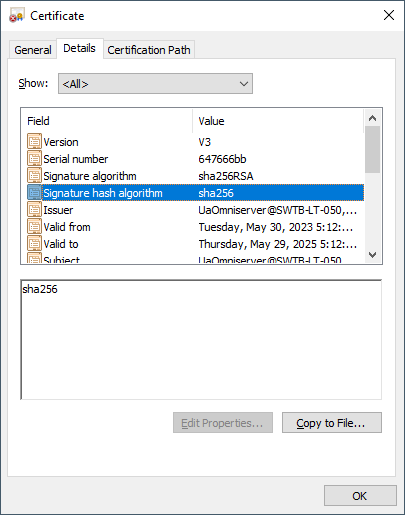
To determine what hash algorithm is used by your UA Certificate, double-click on your certificate to view the Certificate Properties, go to the Details tab, and find the Signature Hash Algorithm field:
If you have any questions, please feel free to contact our support team by emailing support@softwaretoolbox.com or by submitting a ticket.