![SWTB_logo_rgb_color_mode-wPadding-2000x961.png]](https://help.softwaretoolbox.com/hs-fs/hubfs/SWTB_General/Images/Press_Kit/SWTB_logo_rgb_color_mode-wPadding-2000x961.png?height=50&name=SWTB_logo_rgb_color_mode-wPadding-2000x961.png)
The TOP Server Administration tool (server_admin.exe) is registered as a Windows Task Scheduler event by default during the TOP Server installation. This Task Scheduler is triggered by the log on of any user and launches the Administration tool by default.
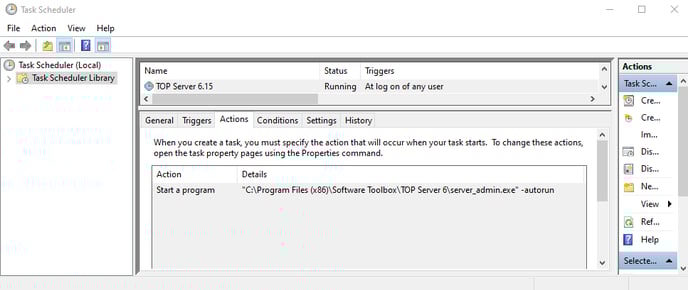
Users can change the conditions on when the Administration tool is launch to avoid permissions issues. To do so, you will need to disable the auto-start of the Administration tool using the following methods:
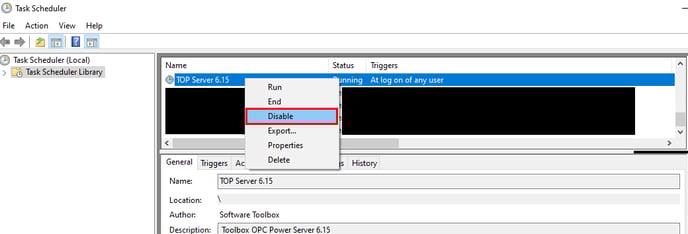
- Disable Windows Task Scheduler Event by right-clicking on event and select disable or delete to remove the entire event.
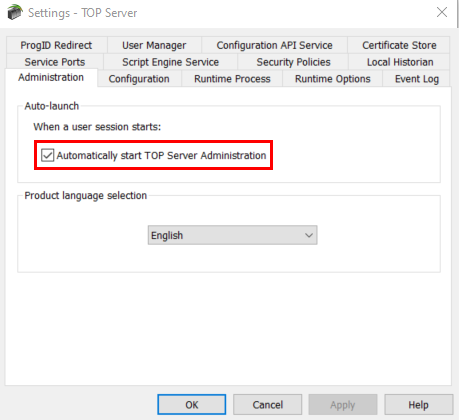
- Uncheck "Automatically start TOP Server Administration" from the Administration Settings menu.
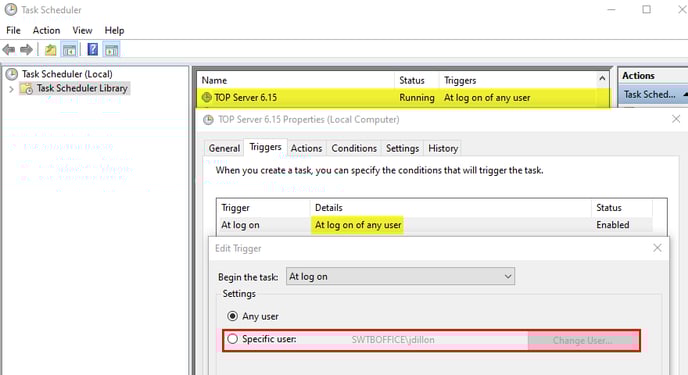
- Another option is to change trigger setting of the task to "at the logon of a Specific User" and select the administrator account. This is recommended for users who have TOP Server running on a Server OS where multiple users connect remotely.
If you have any further questions or have any issues, please contact our support team at support@softwaretoolbox.com