![SWTB_logo_rgb_color_mode-wPadding-2000x961.png]](https://help.softwaretoolbox.com/hs-fs/hubfs/SWTB_General/Images/Press_Kit/SWTB_logo_rgb_color_mode-wPadding-2000x961.png?height=50&name=SWTB_logo_rgb_color_mode-wPadding-2000x961.png)
When using the TOP Server IEC 61850 MMS Client Driver, some, but not all, tags are showing as bad quality in the Quick Client, or other client application. The TOP Server Event Log does not show any errors or warnings for this device or its tags. In this scenario, we know the tag addresses exist in the device and contain the correct syntax because they were auto-generated with the Automatic Configuration Source set as the Device, and not an SCL File. With an SCL File, we introduce the possibililty of the SCL File being outdated and not matching what is actually configured in the device.
The IEC 61850 driver allows users to specify the level at which data is grouped and polled. This is done by altering the Polling Level setting under 'Communication' in the Device Properties.
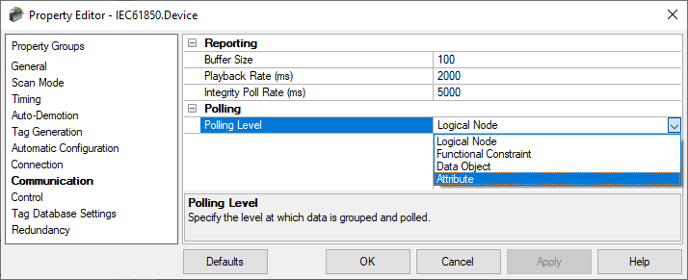
If the Polling Level is set to the default of Logical Node, the driver polls for every attribute within the Logical Node(s) at once. If even one attribute read fails within the Logical Node, the entire Logical Node read fails and all of its tags are set to Bad quality. If this is the case, the Polling Level setting should be changed to Attribute, which will read the attributes individually and transition the valid tags for that particular Logical Node to be Good quality, as expected.
For more details on the configuration parameters of the TOP Server IEC 61850 MMS Client Driver, please see: TOP Server IEC-61850 MMS Client Driver Help File