![SWTB_logo_rgb_color_mode-wPadding-2000x961.png]](https://help.softwaretoolbox.com/hs-fs/hubfs/SWTB_General/Images/Press_Kit/SWTB_logo_rgb_color_mode-wPadding-2000x961.png?height=50&name=SWTB_logo_rgb_color_mode-wPadding-2000x961.png)
DataHub V11 introduces a new, robust connection and security model designed to enhance protection for remote connectivity. These enhancements make DataHub more secure out of the box, but they require additional configuration when upgrading from earlier versions.
For a detailed explanation of the security enhancements added in DataHub V11, visit: Cogent DataHub V11 Security Enhancements Deep Dive
Why am I seeing a "Permission Denied" error?
Older versions of DataHub lack the new security configurations introduced in V11. After upgrading, you must manually configure these parameters to ensure seamless functionality.
For example, if you previously configured a Tunnel Master in DataHub V10 or earlier, upgrading to V11 will result in a "Permission Denied" error in the event log until the security settings are updated.

How to Resolve the Issue:
The most common configuration adjustment involves Security Principals, which define user login contexts based on IP patterns and interfaces. Follow these steps to configure security settings in DataHub V11:
- Navigate to Security > Configure.
- Set the Organization to Internal.
- Choose Mirror, which is the default internal user for Tunnel/Mirror interfaces (while this example uses the Tunnel/Mirror interface, the same can be done for the other listed interfaces with internal users).
- Under Principals, select the principal with the IP pattern
0.0.0.0/0. - Under Roles, check Show Available to view role options.
- Assign the desired roles (e.g., "AllDataReader") based on your requirements.
- Click Apply.
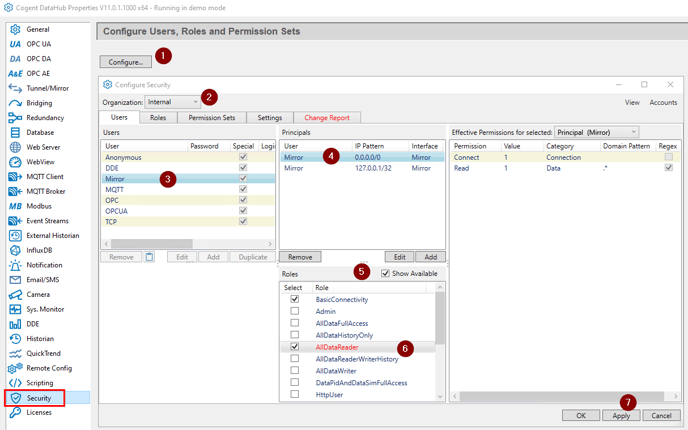
After completing these steps, the "Permission Denied" error should no longer appear in the event log.

Important Note:
The IP pattern 0.0.0.0/0 matches all IP addresses but is NOT recommended for production environments. To improve security, configure a more specific IP pattern that limits access to only the required remote Tunnel slave endpoint or client machine connection.
If you have any questions or need further assistance, please contact our technical support team at support@softwaretoolbox.com.