![SWTB_logo_rgb_color_mode-wPadding-2000x961.png]](https://help.softwaretoolbox.com/hs-fs/hubfs/SWTB_General/Images/Press_Kit/SWTB_logo_rgb_color_mode-wPadding-2000x961.png?height=50&name=SWTB_logo_rgb_color_mode-wPadding-2000x961.png)
Watchdogs are commonly implemented as monitoring tools to ensure the functionality of systems and devices. They work by tracking specific tag values, designated by the user, to provide insight into the status of device connectivity, PLCs, or software such as TOP Server. By observing these values, a watchdog can help report issues such as communication failures, device malfunctions, or software downtime.
What to Look for When Selecting Tags for a Watchdog
- Dynamic Tags: Prioritize PLC tags with continuously changing values, such as system timers, counters, or incrementing variables. These accurately reflect the PLC's operational status. System time is a common selection as continuous increment indicates normal operation.
- Avoid Static Tags: Refrain from selecting tags with infrequent value changes, as they may not provide timely alerts for system issues.
Can I Use TOP Server System Tags for This?
When selecting watchdog tags, it is important to keep in mind the scope of what these tags will represent. A TOP Server system tag will only represent the functionality of TOP Server itself. This could be useful for monitoring the connection between TOP Server and supervisory software but will not give any indication to PLC or device functionality. You can see a list of available System tags here including details.
If you would still like a watchdog for TOP Server specifically, it is best to follow similar guidelines as for PLC Tags. Target constantly changing “heartbeat” tags to get a reliable indicator of system health.
If you would still like a watchdog for TOP Server specifically, it is best to follow similar guidelines as for PLC Tags. Target constantly changing “heartbeat” tags to get a reliable indicator of system health.
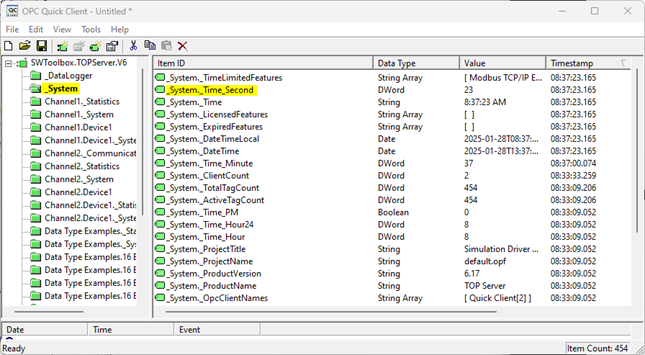
- For this purpose, we recommend: _System._Time_Second. This tag indicates the current second of the system on which the server is running. It can be found at the location below, as shown in a client connection:
Questions/Concerns?
Please feel free to reach out to our support team by either submitting a support ticket or emailing in to support@softwaretoolbox.com.