![SWTB_logo_rgb_color_mode-wPadding-2000x961.png]](https://help.softwaretoolbox.com/hs-fs/hubfs/SWTB_General/Images/Press_Kit/SWTB_logo_rgb_color_mode-wPadding-2000x961.png?height=50&name=SWTB_logo_rgb_color_mode-wPadding-2000x961.png)
When connecting to an SQL Server database from DataCaster, additional connection parameters may be required depending on your server’s security configuration. These parameters help ensure secure and successful connections.
You can enter these extra settings in the Database Connection configuration under the Parameter List section.
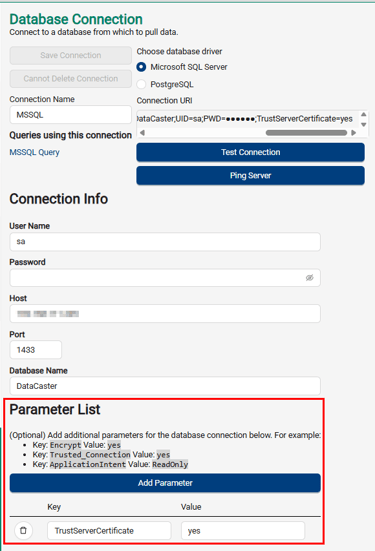
Common Connection Parameters
You can add these parameters based on your environment:
| Key: | Value: |
| Encrypt | yes |
| TrustServerCertificate | yes |
| Trusted_Connection | yes |
| ApplicationIntent | ReadOnly |
To add a parameter, click Add Parameter then fill out the Key and Value fields.
Recommended Starting Point
If you're unsure of what parameters to add, a good default is:
| Key: | Value: |
| TrustServerCertificate | yes |
This bypasses certificate validation and is often needed in lab or other internal test environments. However, for production or secure deployments, consult your SQL Server administrator for proper security settings.