![SWTB_logo_rgb_color_mode-wPadding-2000x961.png]](https://help.softwaretoolbox.com/hs-fs/hubfs/SWTB_General/Images/Press_Kit/SWTB_logo_rgb_color_mode-wPadding-2000x961.png?height=50&name=SWTB_logo_rgb_color_mode-wPadding-2000x961.png)
When attempting to launch the OPC Router's web interface locally, you may be met with this login screen:
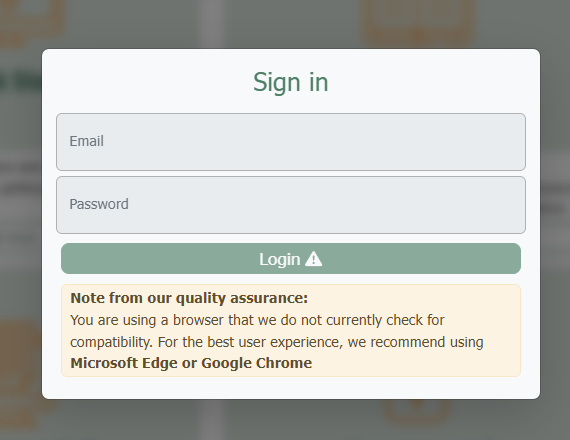
Note: The warning message at the bottom may not be the same as in this screenshot depending on the cause of the behavior
First, ensure that you are using a supported browser such as Microsoft Edge or Google Chrome.
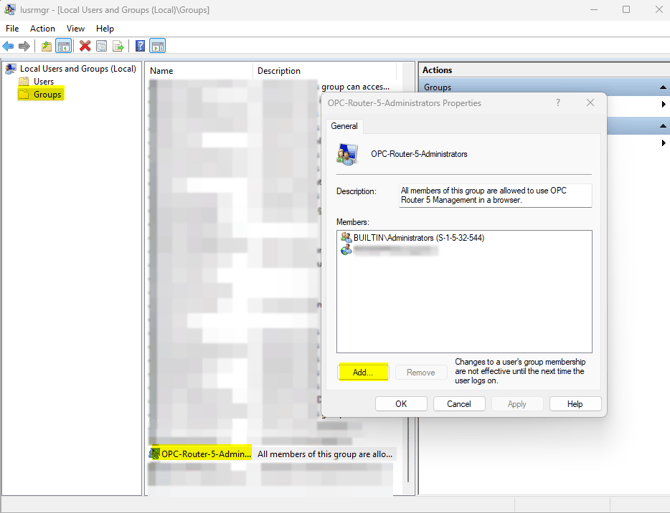
Second, ensure that either the logged in Windows account is a part of the "OPC-Router-5-Administrators" group. This can be found Control Panel ⇒ User Accounts ⇒ Edit local users and groups:
Please feel free to contact our support team at support@softwaretoolbox.com if you have further questions.