![SWTB_logo_rgb_color_mode-wPadding-2000x961.png]](https://help.softwaretoolbox.com/hs-fs/hubfs/SWTB_General/Images/Press_Kit/SWTB_logo_rgb_color_mode-wPadding-2000x961.png?height=50&name=SWTB_logo_rgb_color_mode-wPadding-2000x961.png)
Data diode mode configures the DataHub tunnel slave to immediately discard all incoming data from the tunnel master with zero processing. This mode also allows tunnels to pass through any hardware data diode that supports TCP emulation. The Reconnect every option periodically disconnects and reconnects the tunnel through the data diode, according to the number of minutes specified. This is for data diodes that do not inform the inside connection that the outside connection has closed. Communication will be lost during the disconnect, or the data hierarchy will be missing, until the reconnection occurs.
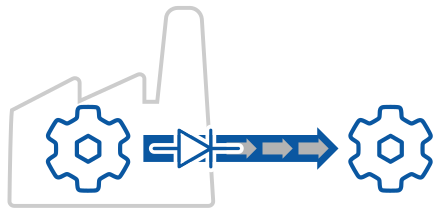
Support for multiple protocols like OPC UA, OPC Classic, MQTT, and Modbus in a unified namespace is fully maintained in data diode mode, allowing you to integrate legacy systems or diverse data sources.
There are three tunnel/mirror options: outbound tunnel with no data diode, data diode software emulation, and data diode hardware support.
Client-Server model – not secure
Most industrial protocols, such as OPC UA, make a client-server connection. This is not secure for remote data access, as it requires opening a port in the firewall to allow an inbound connection. Instead, an outbound DataHub tunnel/mirror connection should be used.
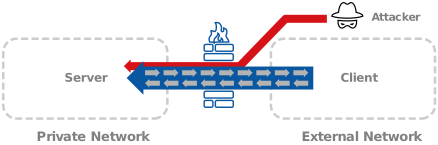
Outbound tunnel with no data diode
An outbound DataHub tunnel/mirror connection keeps all inbound firewall ports closed by reversing the traditional client-server roles, connecting from the data source outbound to the data user. Tunnel/mirroring can support SSL and it blocks external attacks on the data source. However, because the data flow is bidirectional, a compromised program on the data user side could attack the data source, sending malformed TCP packets to be processed.
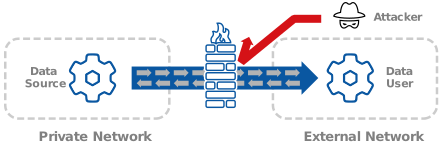
Data diode software emulation
Using data diode mode with DataHub Tunnel/Mirror offers software emulation of a data diode at the data source that immediately discards all incoming application data. Since the data is discarded without processing, there is no chance of application flaws being exploited by malicious packets. A compromised data user cannot attack the data source. TCP control packets and SSL protocol packets (if SSL is used) will still be processed, so attacks targeting the operation system TCP stack and SSL implementation can still be attempted. Since all application data is discarded, data flow over this connection is strictly unidirectional.
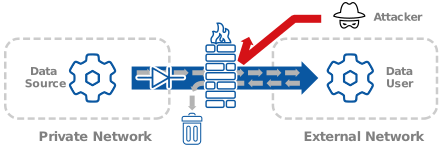
Data diode hardware support
Data diode mode can also be used to provide tunnel/mirror support to most hardware data diodes. The hardware data diode blocks all external attacks, as well as any attacks that may come via a compromised data user, because all TCP packets are simply not delivered. DataHub tunnel/mirror provides connectivity to multiple industrial data protocols in a unified namespace for both data source and data user. This solution can be used with or without a firewall. The one drawback is that SSL is not available when connecting through a hardware data diode. Since all incoming packets are discarded, data flow over this connection is strictly unidirectional.
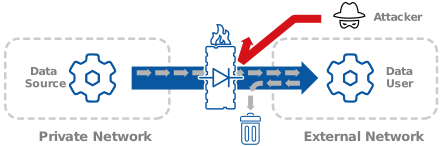
Which of these approach is the best? It depends on your needs. If you need two-way data flow, then you cannot use a data diode. Regular outbound tunnel/mirroring is your best option.
If your data flow is only one way, or if you want to enhance protection on a specific connection for outbound-only data flow, you can configure a tunnel to run in data diode mode. This allows you to keep your SSL implementations while enjoying the benefits of a data diode.
Should you require a hardware data diode, using one with DataHub Tunnel/Mirroring can enhance your connectivity options, allowing you to tunnel OPC UA, DA, MQTT, Modbus, and more through the data diode. Shutting down all incoming data packets should not restrict your choice on the protocol of the data feed you want to access, or the client that receives it.