![SWTB_logo_rgb_color_mode-wPadding-2000x961.png]](https://help.softwaretoolbox.com/hs-fs/hubfs/SWTB_General/Images/Press_Kit/SWTB_logo_rgb_color_mode-wPadding-2000x961.png?height=50&name=SWTB_logo_rgb_color_mode-wPadding-2000x961.png)
This error indicates that TOP Server cannot resolve or validate the user account against Active Directory or the TOP Server's internal User Management.
It may also prevent you from being able to connect the TOP Server v7 Configuration to the Runtime.
In most cases, this means that the user was not explicitly added to the TOP Server User Manager. This occurs because Active Directory users are only recognized if they are mapped to a TOP Server user.
How to add an Active Directory user:
-
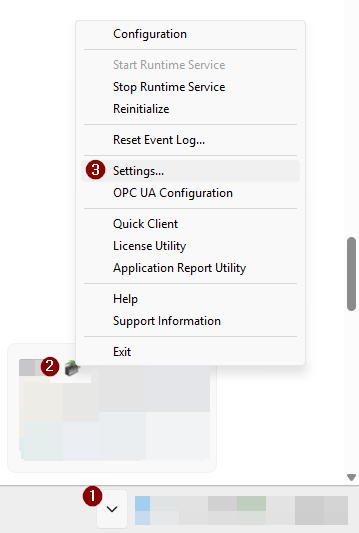
Right-click the TOP Server Administration Icon
-
Select Settings
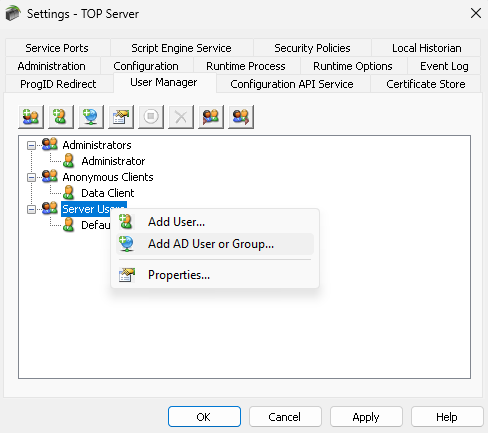
- Select the "User Manager" tab
-
Right-click the group you would like to add them to - Administrators or Server Users. In this example, we are adding the user to "Server Users"
-
Select "Add AD User or Group"
-
Select your domain with the "Locations" button
-
Enter the user name you would like to add, then select "Check Names"
-
Select "OK," and you will now see the AD account under Server Users
- Select "Apply"